

Introduction
Robotic arms show up in places as different as a car assembly line, a surgical theatre, and the International Space Station — the same fundamental technology, adapted to radically different demands.
Whether you're building foundational knowledge or evaluating arm technology for a real deployment, the question that matters most is rarely which names to recognise — it's understanding why each type exists and what mechanical logic makes it the right fit for certain tasks.
That reasoning is what this guide is built around: the mechanics, the trade-offs, and the selection logic that turns a list of arm types into a genuinely useful framework.
TL;DR
Picking the right robotic arm is a mechanical reasoning problem, not a naming exercise.
The type you choose determines the workspace shape, speed envelope, and whether the arm can physically do the job at all. Understanding that logic separates a well-matched system from an expensive mistake.
This article covers:

How robotic arms work — joints, links, and key specs
Major arm types and the mechanical reasoning behind each
Where robotic arms are used — automotive to space
How to match arm type to application requirements
Collaborative robots vs. industrial arms — key distinctions
AI, machine vision, and next-generation arms
What Are Robotic Arms?
Before comparing arm types or evaluating which suits a given task, it helps to be precise about what a robotic arm actually is — mechanically, not just conceptually. The label gets applied to everything from a simple two-axis pick-and-place mechanism to a seven-axis surgical assistant, and without a clear definition, the differences between them are difficult to reason about.
A robotic arm is a programmable mechanical manipulator: a chain of rigid links connected by actuated joints, designed to position and orient an end-effector at a target location in space according to programmed or commanded instructions.
The analogy to a human arm is a useful starting point. The fixed base corresponds to the shoulder; the links are the upper arm and forearm; the joints are the elbow and wrist; and the end-effector is the hand. The analogy holds well enough to build an initial mental model, but it breaks down at a critical point: the human arm has seven degrees of freedom, while most industrial arms have six, and some have fewer or more depending on what they are designed to do.
Anatomy and Command Flow
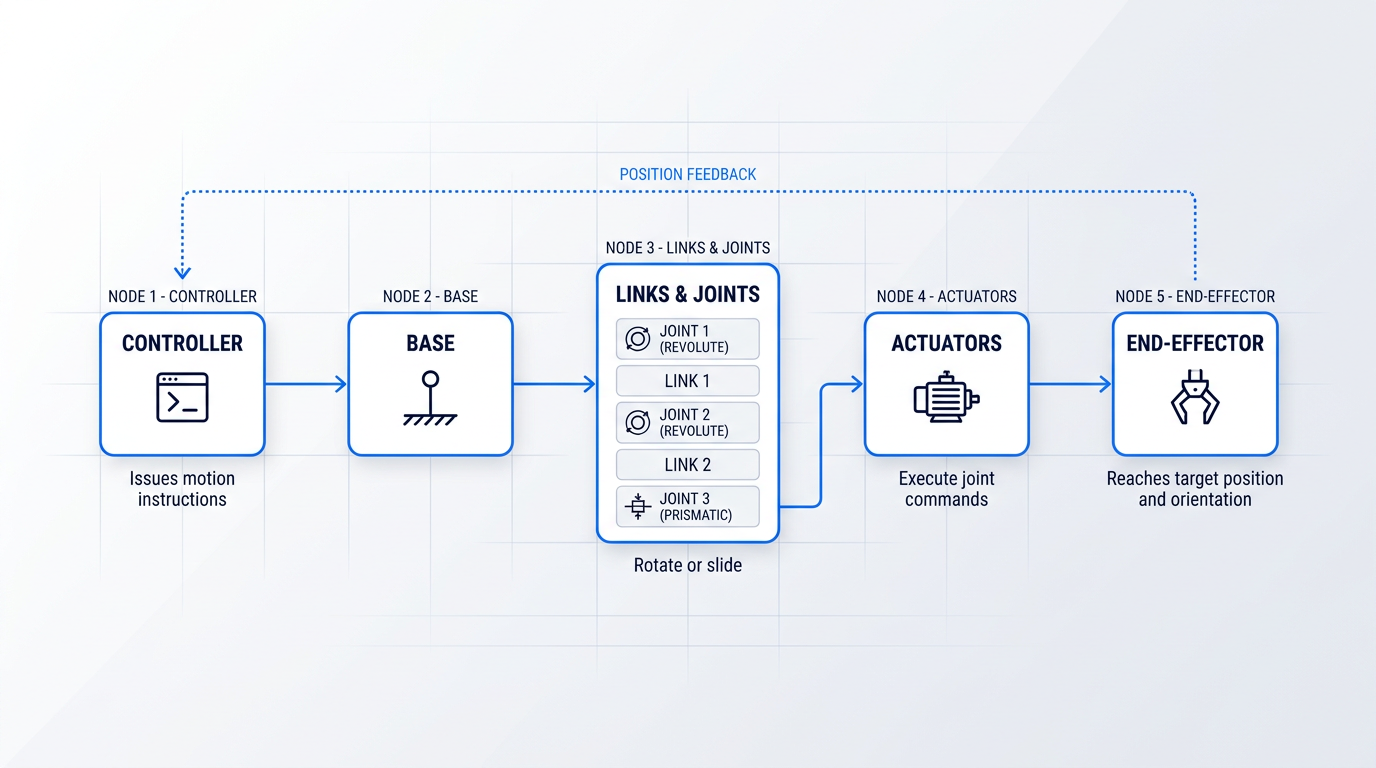
Structurally, every robotic arm follows the same chain: a fixed base anchors the system; links extend from it; joints connect each link to the next; and the end-effector sits at the tip of the final link.
The system moves through a command flow: a controller issues motion instructions, actuators at each joint execute those instructions, the joints rotate or slide, and the links carry the end-effector through space to its target position and orientation.
This is an important distinction from how people often picture a robot moving: the arm is not a monolithic object that swings from point to point, but a coordinated chain of individually controlled joints whose combined motion produces the end-effector's path.
Degrees of Freedom
Degrees of freedom (DOF) refers to the number of independently controllable axes of motion the arm possesses — in practice, the number of actuated joints.
Six DOF is the minimum needed to position and orient an end-effector arbitrarily in three-dimensional space: three DOF to place the end-effector at a specific point (X, Y, Z), and three more to set its orientation at any angle (roll, pitch, yaw).
An arm with fewer than six DOF can still reach many positions, but it cannot achieve every possible orientation at those positions — a constraint that is acceptable for flat, planar tasks but limiting for complex three-dimensional work.
An arm with more than six DOF gains a redundant axis: it can reconfigure its own posture while keeping the end-effector stationary, which is useful for routing around obstacles or reaching into confined spaces without disturbing the tool's position.
Six degrees of freedom is the minimum required to position and orient an end-effector freely in 3D space. Fewer DOF constrains orientation; more DOF adds postural flexibility without changing where the end-effector sits.
Two fundamental joint types determine how each axis moves: a revolute joint produces rotational motion (like a hinge or a shoulder pivot), while a prismatic joint produces linear, sliding motion (like a piston extending along a track).
The arrangement and sequence of these two joint types defines the arm's kinematic geometry, which in turn determines the shape of the volume the end-effector can reach and the kinds of motion the arm can produce.
Workspace, Payload, Reach, and Repeatability
These four parameters are the primary axes for evaluating any robotic arm. They appear throughout this guide whenever a specific arm type or application is discussed.
- Workspace: The complete set of positions the end-effector can reach. Shape and size are determined by joint arrangement and link lengths — revolute joints produce a roughly spherical volume; orthogonal prismatic joints produce a rectangular one.
- Payload: The maximum load the arm can carry at the end-effector, including the weight of any attached tooling. Rated at full extension — performance degrades if the rating is exceeded.
- Reach: The maximum distance from the base to the end-effector when fully extended. Larger reach means a larger workspace, but reach alone does not define workspace shape or usable force at the boundary.
- Repeatability: The arm's ability to return to a previously taught position with precision across many cycles — distinct from absolute accuracy, which is the ability to hit a commanded coordinate without prior physical teach-in.
The distinction between repeatability and absolute accuracy is worth holding clearly: in most production environments, an operator teaches the arm a position once and the arm repeats it thousands of times, so repeatability governs quality.
Absolute accuracy becomes critical only when the arm is programmed offline and must reach coordinates it has never been physically guided to — a scenario common in simulation-driven workflows but less so in conventional teach-and-repeat programming.
DOF, payload, reach, and repeatability will serve as the recurring evaluation axes throughout this guide — applied to each arm type in the next sections and used as the framework for selection logic later on. First, though, it is worth going one level deeper into the individual components that make up the structural chain: the next section covers joints, links, end-effectors, and controllers in detail.
Key Components of a Robotic Arm
Two robotic arms with identical degrees of freedom can behave very differently in practice — one precise and fast, the other slow and compliant, one capable of welding, the other of delicate assembly. The difference lives in the components: the actuators driving each joint, the sensors reading the environment, the end-effector mounted at the tip, and the controller orchestrating it all.
Joints and Links: The Skeleton of the Arm
Revolute joints produce rotational motion and are the dominant joint type in most modern robotic arms, stacking multiple rotational degrees of freedom to produce curved, sweeping workspaces suited to complex three-dimensional tasks.
Prismatic joints produce linear motion along a single axis, and arms built primarily from them trace straight-line paths through rectangular workspaces — a fundamentally different geometry that suits different tasks entirely.
The combination and sequence of joint types is what defines an arm's reachable workspace — this is the mechanical fact that makes the differences between arm architectures meaningful rather than arbitrary.
Links are the rigid structural members connecting one joint to the next; their job is to transmit forces and fix the spatial relationship between joints.
Link length directly sets reach, but longer links reduce structural stiffness and can lower the effective payload ceiling — the arm becomes a longer lever, amplifying the bending moment at each joint under load.
Material choice shapes dynamic performance: steel links offer high stiffness and payload capacity; aluminium reduces mass without sacrificing too much rigidity; carbon fibre composites enable faster acceleration and higher cycle rates, though they can introduce compliance under heavy or off-axis loads.
Actuators: What Drives Each Joint
An actuator converts energy into mechanical movement at each joint — it is the component that actually produces the motion the controller commands.
Electric servo actuators paired with encoders are the dominant choice in modern industrial and collaborative arms, offering precise position control, programmability, and repeatable performance across millions of cycles.
A key property of well-designed electric actuators is backdrivability — the ability to move the arm by applying external force to its links, rather than commanding it through the controller.
Backdrivability is not incidental: it is a foundational requirement for collaborative operation, because an arm that can be pushed back when it contacts a person can limit the forces it exerts — a concept that will matter considerably when collaborative robots are discussed later.
Hydraulic actuators deliver very high force output in a compact form and are used where payload demands exceed what electric motors can practically achieve, but they introduce fluid system complexity, leakage risk, and are poorly suited to precision positioning tasks.
Pneumatic actuators are fast and mechanically simple, but positioning them at intermediate points along their travel is difficult — they suit applications where speed and simplicity matter more than fine positional control.
End-Effectors: The Working Tool
The arm itself is a positioning system — it moves a point in space to a commanded location with high repeatability. What actually performs the task is the end-effector mounted at the terminal link.
End-effector variety is enormous because tasks are enormously varied, and the choice of end-effector determines what the arm can do far more directly than any other single component.
- Mechanical grippers: Finger-style grippers that grasp by applying clamping force; suited to rigid, consistently shaped parts.
- Pneumatic grippers: Air-actuated grippers offering fast open-close cycles; common in high-throughput pick-and-place applications.
- Vacuum / suction cups: Grip flat or smooth surfaces without mechanical contact; widely used for sheet materials and consumer packaging.
- Magnetic grippers: Attract ferrous workpieces without contact; useful for metal sheet handling where mechanical gripping is impractical.
- Adaptive grippers: Underactuated designs that conform to irregular shapes; handle varied part geometries without reprogramming.
- Process tools: Welding torches, laser heads, spray guns, and drilling spindles — the arm positions the tool, the tool performs the process.
End-effectors are interchangeable via tool changers — automatic coupling mechanisms that allow a single arm to swap between different tools mid-process, without human intervention.
This interchangeability is what makes modularity practically useful: one arm can weld a joint, swap to an inspection camera, then swap again to apply sealant — all within the same automated cell.
Sensors: Extending the Arm's Awareness
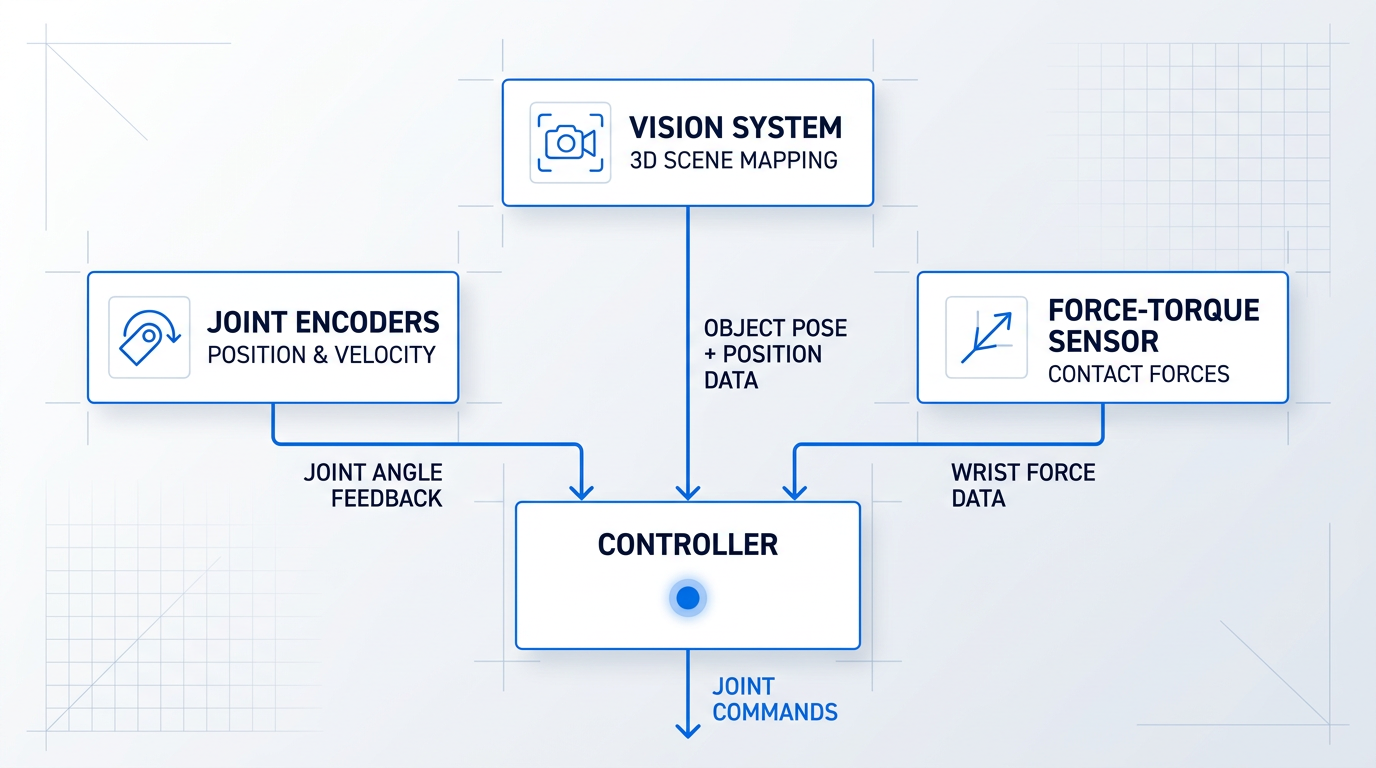
Encoders at each joint measure actual joint position and velocity, feeding that data back to the controller continuously — without this signal, the arm is open-loop and has no way to detect or correct for errors introduced by load, friction, or disturbance.
Force-torque sensors mounted at the wrist measure the contact forces and torques acting between the end-effector and whatever it is touching, enabling the arm to modulate its own force during assembly tasks with tight tolerances or surface-finishing operations requiring consistent contact pressure.
Force-torque sensing is also the mechanism by which an arm can detect unexpected contact — a capability that underpins collaborative safety and, later in this guide, AI-driven manipulation strategies.
Vision systems — cameras and 3D scanners — extend the arm's perception beyond its own joint states to the surrounding environment, enabling object detection, pose estimation, and scene mapping that static programming alone cannot achieve.
Controllers: From Command to Motion
The controller is the computational layer that translates a high-level task instruction — "move the end-effector to this position and orientation" — into specific joint-angle commands executed by each actuator.
Forward kinematics answers the question "where am I?": given the current angle at every joint, calculate the resulting position and orientation of the end-effector in space.
Inverse kinematics answers the harder question: given a desired end-effector position and orientation, calculate the joint angles that achieve it — harder because there may be multiple valid joint configurations for a single target pose, or no valid configuration at all if the target lies outside the arm's workspace.
Path planning goes further still, generating a smooth, collision-free trajectory through space between waypoints rather than computing angles for isolated target positions — the difference between plotting a destination and planning the full route.
Actuators, encoders, and the controller form a continuous feedback loop: the controller commands a position, the actuator moves toward it, and the encoder reports the actual result — allowing the controller to correct in real time. The arm does not simply move to a position; it converges on it.
Modularity: One Arm, Many Configurations
Tool changers and modular arm architectures are an emergent benefit of the component-based design: because joints, links, and end-effectors are discrete, interchangeable units, the same physical arm can be reconfigured — different link lengths, additional joints, or a different end-effector — to match a new task without purchasing dedicated hardware.
This is the practical meaning of flexible manufacturing: a single robotic arm, properly specified at the component level, can be redeployed across multiple tasks as production needs change.
With a clear picture of how joints, links, actuators, sensors, end-effectors, and controllers each shape what an arm can do, the differences between arm types become mechanical rather than categorical — the next section examines how specific combinations of these components produce the distinct kinematic architectures that define each type of robotic arm.
Types of Robotic Arms Explained
Choose the wrong arm type and no amount of tuning will make it work well — because the type determines the shape of the workspace, the speed envelope, and the fundamental mechanical trade-offs before a single parameter is set. Understanding why each configuration exists, and what its kinematic structure actually produces, is the first step toward matching the right arm to the right task.
Articulated Arms
Articulated arms are the dominant configuration in industrial automation: all-revolute joints, typically arranged across six axes, in a structure that mirrors the shoulder-elbow-wrist geometry of a human arm.
The all-revolute arrangement produces a large, irregular, roughly spherical workspace — one that allows the end-effector to reach into confined spaces and approach a workpiece from virtually any angle, including from below or behind.
That spatial freedom is the core mechanical advantage: no other configuration matches it for complex, multi-angle motion paths. Payload range is correspondingly vast — from under 5 kg for precision electronics handling to over 2,000 kg for heavy automotive press tending — which reflects how broadly this type is deployed across industries.
The trade-off is kinematic complexity. Path planning is more demanding than for simpler types, inverse kinematics calculations are non-trivial, and integration overhead is higher. For tasks where that complexity is justified by the motion requirements, articulated arms are the natural workhorse. For tasks that don't need multi-angle reach, simpler configurations often outperform them.
SCARA Arms
SCARA — Selective Compliance Assembly Robot Arm — uses two parallel revolute joints for horizontal motion and a prismatic joint for vertical insertion, giving it four axes in total.
The defining mechanical property is selective compliance: the arm is deliberately flexible in the horizontal plane, allowing it to absorb small lateral misalignments during insertion tasks, while remaining rigid along the vertical axis to resist deflection under pressing or joining forces.
This combination makes SCARA arms exceptionally well suited to fast pick-and-place and peg-in-hole insertion — tasks where horizontal compliance prevents jamming and vertical rigidity ensures precise depth control. The workspace is cylindrical, and cycle times can reach as low as 0.3 seconds for small-part operations.
The limitation is that the cylindrical workspace constrains the arm to relatively flat task geometries. It cannot match an articulated arm's ability to approach from arbitrary angles or reach around obstacles. The advantage is high repeatability — down to ±0.015 mm in compact models — at lower cost and integration complexity than a six-axis arm.
Cartesian and Gantry Robots
Cartesian robots use three orthogonal prismatic joints — one each for X, Y, and Z — producing a rectangular workspace that maps directly onto the joint structure.
That geometric simplicity is the key mechanical strength: motion is rectilinear, there are no complex kinematics to solve, and linear axes are inherently stiff and straightforward to calibrate for high positional accuracy across large working volumes.
In gantry configurations, the robot is mounted overhead on a spanning frame, allowing it to cover very large areas — warehouse retrieval bays, large-format 3D printing beds, CNC machine-tending cells — while keeping the working volume directly beneath the structure.
The limitation is the absence of rotational freedom: without a wrist assembly, the arm cannot change approach angle. This makes Cartesian and gantry robots ideal when the task geometry is rectangular and approach direction is fixed, but ill-suited to tasks requiring varied orientation.
Delta and Parallel Robots
Delta robots use a parallel kinematic structure: three (or four) arms are connected to a common overhead base via universal joints, and all actuators are fixed at the base, with only a small lightweight platform moving at the end.
Fixing the drives at the base is the mechanical reason for the speed advantage — the moving mass is extremely low, so the arm can accelerate and decelerate very rapidly. Cycle times below 0.32 seconds are achievable in pick-and-place operations, making delta robots the fastest configuration for light-payload tasks.
The workspace is a cylindrical volume beneath the base (the arms sweep out a roughly cylindrical reachable zone as they extend downward), and payload capacity is limited — typically under 15 kg, with most high-speed applications well below that.
Delta robots dominate high-speed pick-and-place in food, pharmaceutical, and electronics packaging precisely because cycle rate is the primary constraint in those applications and payload is small. Where speed is the bottleneck, no other configuration competes.
Cylindrical Robots
Cylindrical robots combine a rotary base joint with prismatic vertical and horizontal joints, producing a cylindrical annular workspace around the central axis.
The kinematic structure is simpler than an articulated arm, which historically made cylindrical robots attractive for station-based tasks requiring rotation around a central point — die casting extraction, machine loading, coating in circular patterns — where the cylindrical workspace geometry naturally matched the task layout.
In modern automation, cylindrical robots have been largely displaced by articulated arms, which now offer comparable or greater flexibility at similar price points. They retain niche relevance where the cylindrical workspace is a genuine fit and simpler kinematics reduce integration overhead, but they are not a growth segment.
Polar and Spherical Robots
Polar robots — also called spherical robots — use a twisting base joint, one rotary joint, and one prismatic joint, producing a partial-spherical workspace.
This was one of the earliest industrial robot configurations, historically used in die casting, injection moulding, and glass handling, where large spherical reach with mechanically simple kinematics was sufficient.
Polar robots are now largely superseded by articulated arms in most applications. They are worth understanding for historical context and for the small number of tasks where a large-radius spherical reach with minimal kinematic complexity is genuinely the best fit, but they represent a minor category in contemporary automation.
Collaborative Robots (Cobots)
Collaborative robots, or cobots, are not a distinct kinematic type. Most are six-axis articulated arms. The distinction is a design philosophy: cobots are engineered from the outset to share a workspace with human workers without fixed guarding.
That philosophy is realised through power-and-force limiting: integrated torque sensors at each joint monitor contact forces and stop the arm the moment a threshold is exceeded. Rounded external geometry reduces injury severity on contact, and speed and separation monitoring can further moderate behaviour when a person is detected nearby.
The programming paradigm also differs: hand-guided teaching — physically moving the arm along a desired path to record it — and graphical no-code interfaces make cobots faster to redeploy across tasks without specialist programming knowledge.
The trade-off is real and should be stated plainly: a cobot is slower and carries a lower payload ceiling than an industrial arm of equivalent physical size. Universal Robots' current range spans 3 to 30 kg payload with reach up to approximately 1.8 metres — capable figures, but below what an industrial articulated arm of similar dimensions can achieve. That gap is the price of the safety architecture that enables human co-presence.
A cobot is not a smaller or safer industrial robot — it is a different engineering intent. The deployment context is fundamentally different: shared workspaces, high-mix low-volume tasks, and applications where human dexterity and robot precision need to operate in close proximity.
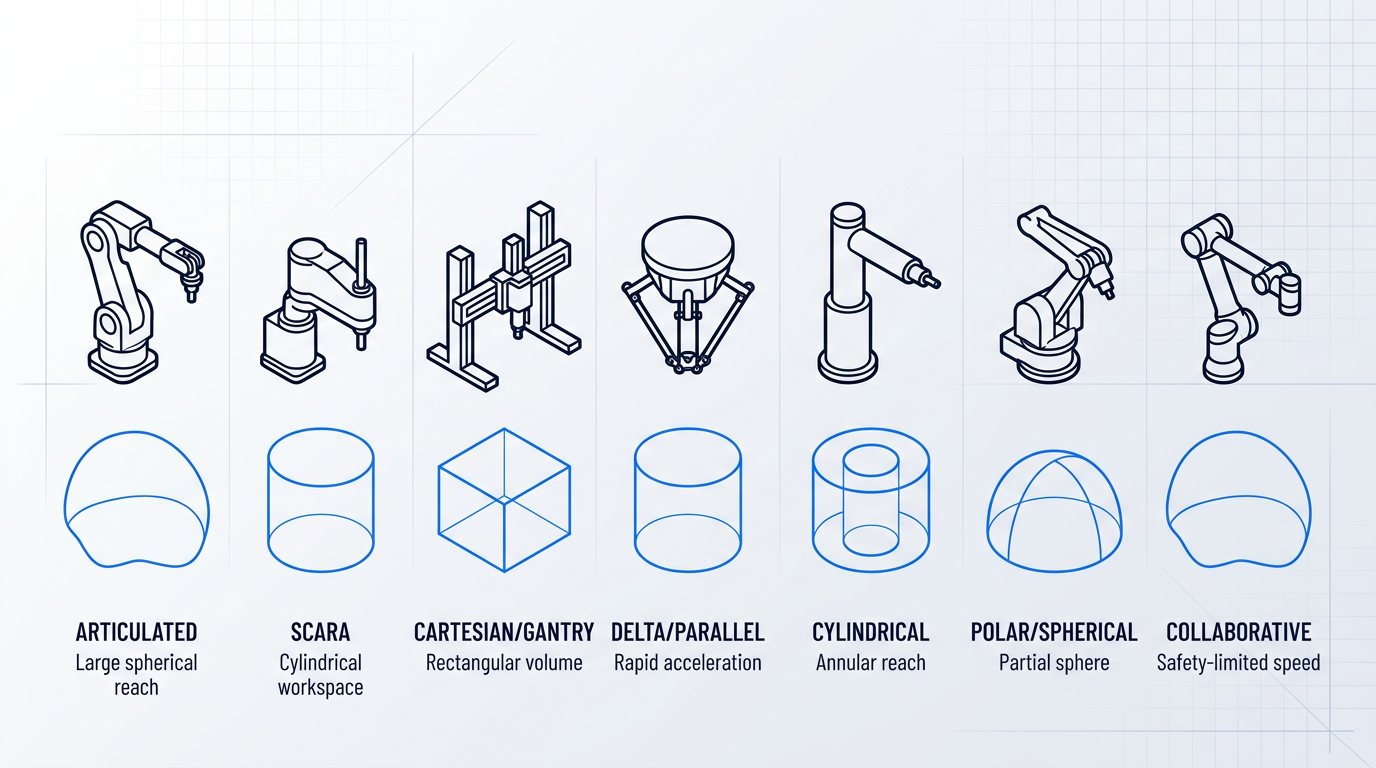
The table below summarises all seven types across the axes most relevant to task matching — joint structure, workspace shape, payload range, relative cycle speed, and primary application domains.
| Arm Type | Joint Structure | Workspace Shape | Typical Payload Range | Relative Speed | Primary Applications |
|---|---|---|---|---|---|
| Articulated | 6 revolute joints (RRR-RRR) | Irregular spherical | < 5 kg to > 2,000 kg | Medium to high | Welding, painting, heavy handling, assembly |
| SCARA | 2 revolute + 1 prismatic (4 axes) | Cylindrical | 5 kg to 60 kg | High (cycle ~0.3–0.45 s) | Pick-and-place, peg-in-hole insertion, electronics assembly |
| Cartesian / Gantry | 3 prismatic (PPP, X-Y-Z) | Rectangular / cubic | Wide range; suited to heavy loads | Medium | CNC tending, large-format 3D printing, warehouse gantry |
| Delta / Parallel | Parallel arms, base-mounted drives (3–4 DOF) | Cylindrical beneath base | < 15 kg (typically 3–6 kg) | Very high (cycle < 0.32 s) | High-speed packaging, food/pharma sorting, electronics pick-and-place |
| Cylindrical | 1 revolute + 2 prismatic (RPP) | Cylindrical annulus | 10 kg to 50 kg | Medium | Die casting, machine loading/unloading, coating |
| Polar / Spherical | 2 revolute + 1 prismatic (RRP) | Partial sphere | Variable; historically medium | Low to medium | Die casting, injection moulding (largely superseded) |
| Collaborative (Cobot) | 6 revolute (articulated), torque-sensored | Irregular spherical | 3 kg to 30 kg (UR range) | Low to medium (safety-limited) | Shared human-robot tasks, high-mix assembly, flexible redeployment |
Comparison of all seven robotic arm types across kinematic structure, workspace geometry, payload, speed, and primary applications — giving readers a single-view reference after the detailed prose descriptions.
The table reveals a clear pattern: speed and payload trade inversely across the spectrum. Delta robots achieve sub-0.32-second cycle times precisely because their payload ceiling is low — fixing the drives at the base eliminates moving mass, but that architecture cannot support heavy loads. Articulated arms cover the widest payload range but require the most complex path planning. Cobots occupy a distinct band: their payload and speed figures are not limited by kinematic constraints but by the safety architecture that makes human co-presence viable.
SCARA and Cartesian arms both achieve high positional accuracy but through opposite mechanical approaches — SCARA through joint stiffness and selective compliance, Cartesian through the inherent precision of linear axes. Choosing between them comes down to workspace geometry: cylindrical task layouts favour SCARA; rectangular, large-format layouts favour Cartesian.
Arm type is not just a specification category — it determines the fundamental geometry of what the robot can reach and how it can approach a workpiece. Matching type to task geometry is the first selection decision, and no amount of payload or reach optimisation can compensate for a geometric mismatch.
With the type taxonomy established, the natural next question is where each configuration actually appears in practice — and the answer reveals just how closely arm type, workspace geometry, and task geometry align across real industrial sectors.
What Are Robotic Arms Used For?
The same technology that welds a car body, fills a pharmaceutical vial, and operates on a patient's knee also collects rock samples on the surface of Mars — robotic arms span a wider range of contexts than almost any other class of machine.
In each case, a specific arm type was chosen because its mechanical characteristics matched the demands of the task: workspace geometry, degrees of freedom, speed envelope, and payload capacity are the deciding factors, not convention.
Automotive Manufacturing
Articulated arms dominate body-in-white spot welding because their six-axis freedom and large spherical workspace allow them to reach weld positions across complex body structures, delivering thousands of precisely placed welds per vehicle at consistent quality.
The same arm type is the standard choice for paint application: its continuous path control maintains a consistent stand-off distance and spray angle throughout each pass, producing uniform coating thickness and reducing overspray.
In final assembly, cobots are taking on ergonomic-risk tasks and in-cell quality checks alongside human workers — their power-and-force limiting architecture makes shared workspace viable without hard guarding, which a conventional industrial arm cannot offer.
Aerospace
Drilling, riveting, and fastening on fuselage and wing structures demand positional tolerances measured in fractions of a millimetre, which is why high-repeatability articulated arms are the established choice — their reach can access the curved geometry of fuselage panels at angles that fixed tooling cannot.
Surface treatment of complex 3D components such as turbine blades and engine parts places the same demand on multi-axis reach: the arm must follow curved geometry while holding consistent tool orientation throughout the path. Our AutoLASE system, developed by Woodrow Scientific Limited, uses an articulated arm to carry a laser cleaning head across aerospace components exactly this way — machine vision scans the loaded part, builds a 3D map, and generates the cleaning path automatically, so the arm cleans contours and angles that a fixed or gantry system could never access.
Electronics and Semiconductor
SCARA robots are the standard for PCB assembly and component placement because their selective compliance absorbs lateral misalignment during insertion while maintaining high repeatability in the horizontal plane — the mechanical profile that fast, precise surface-mount work requires.
For high-speed component transfer between stations, delta robots are preferred: the parallel kinematic structure keeps moving mass extremely low, enabling the rapid acceleration and deceleration that throughput-driven electronics lines demand, while cleanroom-rated articulated arms handle wafer handling and inspection in semiconductor fabrication.
Food, Beverage, and Pharmaceutical
Delta robots dominate primary packaging pick-and-place because the parallel kinematic structure delivers high speed alongside smooth, washdown-rated surfaces and the precise force control needed to handle fragile or irregularly shaped products without damage.
SCARA arms handle vial filling, capping, and blister-pack insertion — repetitive horizontal-plane operations where SCARA's insertion precision is the critical mechanical fit — while cobots serve flexible, low-volume packaging lines where frequent product changeovers and human co-presence make a reconfigurable, safely compliant arm the practical choice.
Logistics and Warehousing
Articulated arms equipped with vision systems handle bin picking because the arm's large spherical workspace and six-axis freedom, combined with machine vision, allow it to identify and grasp randomly oriented items from unstructured bins — a task that a fixed-geometry arm cannot perform reliably.
Cartesian and gantry systems handle automated storage and retrieval, where their rectangular workspace geometry is a direct mechanical match for the rectilinear layout of warehouse racking, while cobots support order fulfilment tasks alongside human pickers in mixed-workflow zones.
Healthcare and Surgical Robotics
Surgical robotic arms represent a distinct category from industrial automation, operating under entirely different regulatory and safety frameworks and designed to work within the human body rather than around a workpiece.
Systems such as the da Vinci surgical system and the Stryker Mako orthopaedic platform illustrate how robotic arm technology is applied in precision surgical assistance — using wristed instruments and haptic guidance to achieve degrees of dexterity and positional control that manual technique alone cannot consistently replicate in confined anatomical spaces.
Research, Education, and Space Exploration
Academic and research institutions use lightweight, compliant 7-DOF platforms for manipulation research, AI training datasets, and robotics education; many are ROS-compatible, enabling open-source development communities to build on a shared software foundation — a topic the programming section covers in depth.
Space exploration pushes arm design into territory with no industrial parallel: the Canadarm series on the Space Shuttle and International Space Station were engineered for payload handling and astronaut support in an environment defined by extreme temperature swings, radiation exposure, and remote operation across communication latency that rules out real-time human control.
NASA's Perseverance rover carries a robotic arm for surface sampling and instrument deployment on Mars — an application where thermal cycling, a near-vacuum atmosphere, and multi-minute communication delays with Earth drive design requirements that bear almost no resemblance to any factory setting.
Across every sector, the arm type that wins is the one whose native workspace shape fits the physical layout of the task — spherical for complex body structures, rectangular for warehouse racking, parallel-kinematic for flat high-speed lines. Matching workspace to task geometry is the single most reliable predictor of which arm type a sector standardises on.
Each of these sectors arrived at its arm type through the same underlying reasoning: matching mechanical capability to the specific demands of the task. The next section turns that pattern into a practical framework for selecting the right arm type for a given application.
How to Choose the Right Robotic Arm
Every arm type covered in this guide is the right answer for something — the question is never which arm is best in the abstract, but which arm fits the specific demands of your task. Getting that match right from the start determines whether your installation performs as expected or spends its working life fighting its own limitations.
Start with Workspace Geometry
Workspace geometry is the first filter — and it eliminates the majority of mismatches before a single specification is compared.
Ask yourself what shape the task occupies in space. A task that moves along linear axes within a rectangular envelope suits a Cartesian or gantry arm, which delivers predictable, high-stiffness motion across that geometry. A task confined to a flat plane but demanding high-speed transfers favours a SCARA or delta robot, where the mechanical architecture is purpose-built for that motion profile. A task requiring complex three-dimensional paths with varied approach angles — welding, deburring, multi-face assembly — calls for an articulated arm, where the additional degrees of freedom justify the added complexity.
This single question narrows the field substantially before payload, speed, or cost enter the conversation at all.
Payload and Reach: Calculate, Then Add Margin
True payload is not the weight of the workpiece alone — it is the total mass at the end-effector: the tooling, the gripper, any cabling attached to the tool, and the workpiece itself, evaluated at the arm's full extension where the mechanical leverage is at its worst.
The practitioner rule is to build in a 20–30% safety margin above that calculated figure. This headroom absorbs future tooling changes, heavier end-effectors added mid-project, and the dynamic loads generated during acceleration and deceleration. Undersizing payload is not just a performance problem — it accelerates mechanical wear at every joint and leads to premature failure, which is a far costlier outcome than selecting the next capacity tier at the outset.
Reach requires the same rigour. The figure on a spec sheet is the arm's theoretical maximum reach — the radius of the largest sphere the tool centre point can theoretically touch. What matters for your application is whether the arm can access every required position in every required orientation without entering a singularity configuration: a posture where two or more joint axes align, causing the arm to lose a degree of freedom and making motion unpredictable. Verify reach against your actual task geometry, not the headline number.
Speed, Cycle Time, and Accuracy
Not all speed requirements are equivalent, and conflating them leads to poor selections. High-frequency repetitive motion — a pick-and-place operation cycling thousands of times per hour — is where delta robots lead, delivering the fastest raw cycle rates in the industry. The trade-off is limited payload and a constrained workspace.
Tasks requiring complex multi-axis paths with acceleration and deceleration at multiple waypoints favour articulated arms, which sacrifice raw cycle rate for the versatility to execute those paths at all. Identifying which profile your application actually requires is more useful than chasing the highest speed figure in a catalogue.
The accuracy question is where many buyers make a costly mistake. Repeatability — how precisely the arm returns to a previously taught position over thousands of cycles — is the specification that governs the vast majority of production tasks. But it is not the same as absolute accuracy, which describes how precisely the arm reaches a commanded coordinate in space without any prior teach-in.
If you teach positions manually or via a pendant, scrutinise repeatability. If you download paths from a CAD or simulation environment and expect the arm to execute them without a teach-in step, absolute accuracy is the specification that matters — and most arms with excellent repeatability have mediocre absolute accuracy.
Environmental Conditions as Hard Constraints
Environmental requirements should be treated as hard constraints that narrow the field before any specification comparison begins — not as a secondary consideration.
Dust, moisture, and washdown exposure are governed by IP ratings under IEC 60529; food, outdoor, and wet-process environments typically require a minimum IP67 rating or higher. Electronics, semiconductor, and pharmaceutical applications demand cleanroom-certified variants meeting the relevant ISO 14644-1 cleanliness class. High-temperature environments such as die casting and forge work require purpose-built foundry-rated arms. Hazardous atmospheres containing flammable gases or dusts require ATEX or IECEx certification — a requirement that eliminates most standard arms immediately, regardless of how well they match on payload or reach.
Industrial Arm vs. Cobot: A Deployment Philosophy
The decision between a traditional industrial arm and a collaborative robot is frequently framed as a safety question. That framing misses the point.
The real question is one of deployment philosophy: do human workers need to share the workspace with the arm during operation? If they do, a cobot's power-and-force limiting and speed-and-separation monitoring capabilities can eliminate the need for fixed guarding entirely — changing the economics, the floor footprint, and the flexibility of the installation. If the workspace can be fully segregated, a traditional industrial arm delivers higher speed and a substantially higher payload ceiling.
Cobots are not inherently safer than industrial arms operating behind guarding — both configurations, properly implemented, protect workers. The choice is between a segregated cell and a shared workspace, and the right answer depends entirely on how the task and the human workflow interact.
Total Cost of Operation, Not Capital Cost
Evaluating robotic arms on purchase price alone is one of the most reliable ways to make a poor long-term decision. The capital cost is a single payment; the operational cost accumulates over a realistic working life of 10–15 years.
A complete cost picture includes: integration and commissioning, initial and ongoing programming costs, maintenance schedules and spare parts, energy consumption, any consumable costs the arm eliminates or introduces, and the reduction in manual labour overhead the system delivers.
An arm that eliminates consumable costs, maintains consistent output without operator intervention cycle after cycle, and can be redeployed to a new task without engaging a specialist integrator will frequently deliver a substantially stronger total cost of ownership than a lower-priced alternative — even when its capital cost is meaningfully higher. This is not a theoretical position; it is the practical experience of buyers who have evaluated both columns of the ledger.
A closely related criterion — one that deserves equal weight in any serious evaluation — is programming and deployment accessibility. Industrial arms typically require specialist integrators, proprietary programming environments, and significant lead time to redeploy. Cobots and modern vision-guided systems increasingly support hand-guided teaching, graphical programming, and auto-path generation. For organisations that are not robotics specialists, the ability to deploy and redeploy in-house has real, quantifiable economic value that rarely appears on a capital cost comparison.
The industrial arm versus cobot distinction, however, runs considerably deeper than a line item in a selection framework. It reflects a fundamentally different design philosophy — one the next section unpacks in full.
Collaborative Robots: A Different Philosophy
The distinction between a collaborative robot and an industrial arm is not about size, and it is not a marketing label applied to robots that happen to look friendlier. It is a fundamental difference in design intent: industrial arms are built to work in place of humans inside segregated, guarded cells; cobots are built to work alongside humans in a shared workspace.
That single design assumption — that a human might be nearby at any moment — flows through every aspect of the arm's architecture: rounded geometry with no pinch points, backdrivable joints with low inertia that can be moved by hand without fighting motor resistance, integrated torque sensors at every joint, and a programming paradigm designed for production floor staff rather than specialist integrators.
The Four Collaborative Operation Modes
The safety architecture that makes collaboration physically possible is defined in two ISO documents: ISO 10218-1, the base safety standard for industrial robots, and ISO/TS 15066, the technical specification that supplements it for collaborative applications — including guidance on risk assessment and an informative annex covering biomechanical limits for human-robot contact forces and pressures.
A critical conceptual point from the standards themselves: 'collaborative' describes an application, not a robot type. Whether a deployment is collaborative is determined by risk assessment under these standards — not by whether the robot is marketed as a cobot. A cobot running at full speed behind a guarded fence is not a collaborative application; an industrial arm with appropriate safety functions could be one, though this is uncommon in practice.
- Safety-Rated Monitored Stop: The robot stops before a human can reach any hazard in the shared space and resumes only when the human leaves. Robot and human are never in motion simultaneously.
- Hand Guiding: The operator physically controls the arm's motion by guiding it directly. Used for teaching and for tasks requiring human dexterity combined with robotic precision.
- Speed and Separation Monitoring: External sensors — laser scanners, camera systems — continuously track human distance. The robot slows as a person approaches and resumes full speed as distance increases.
- Power and Force Limiting: Integrated joint torque sensors detect contact forces and trigger an immediate stop if they exceed the biomechanical limits specified in ISO/TS 15066. No physical separation required.
Power-and-force limiting (PFL) is the mode that enables true side-by-side work without any physical separation between human and robot, because the arm itself detects and responds to contact. The mechanism depends on three properties working together: integrated torque sensors at every joint that continuously measure forces, low-inertia design that minimises the energy the arm carries at a given speed, and backdrivable joints that allow the arm to yield on contact rather than resist it.
PFL works by limiting the kinetic energy of the arm's moving mass, which means limiting speed. A cobot operating in fully collaborative PFL mode — no guarding, no fence — is genuinely slower than the same arm running in a conventional guarded cell. The right question is not 'is the cobot safe enough?' but 'does having a human in the workspace actually add value to this task?' If yes, the trade-off is worth making. If no, the safety architecture is overhead with no return.
Programming and Deployment Philosophy
Hand-guided teaching — where the operator physically moves the arm through the desired path and the arm records the waypoints — is only possible because the arm is backdrivable. Low-friction joints offer no resistance to manual movement, so a production floor worker can teach a new programme without a teach pendant, without writing code, and without calling in a specialist.
Cobots also typically ship with graphical, drag-and-drop programming environments that allow non-specialists to build and modify programmes in minutes. The combination means a cobot can be redeployed to a new task in hours rather than days — a genuine operational advantage for flexible, high-mix, low-volume production where the task changes frequently.
This is the deployment philosophy difference in practical terms: cobots are designed to be owned and operated by the people running the production floor, not by a robotics integration team brought in for every reconfiguration.
Cobots vs. Industrial Arms: Honest Trade-offs
- Shared workspace tasks: When human workers need to enter the cell — for ergonomic-risk tasks, quality checks, or judgement-dependent steps — cobots eliminate the need for guarded separation entirely.
- Frequent redeployment: High-mix, low-volume production where the task changes regularly favours cobots; hand guiding and graphical interfaces make reconfiguration fast without specialist support.
- Small-to-medium payloads: Current cobots support payloads up to approximately 35 kg, covering a wide range of assembly, machine tending, packaging, and inspection tasks.
- Constrained floor space: Eliminating fixed safety guarding reduces the physical footprint of the installation significantly — a real advantage in space-limited facilities.
- Non-specialist buyers: Organisations without in-house robotics programming expertise can deploy and redeploy cobots without an external integrator for every change.
These advantages are real, but they are conditional: they apply when the task genuinely requires human co-presence, frequent reconfiguration, or both. When neither condition holds, the cobot's safety architecture provides no operational benefit.
- Very high-speed production: PFL requires operating below the speeds at which contact forces exceed biomechanical limits. Industrial arms optimised for throughput will outperform cobots on cycle time.
- Heavy payloads: Cobot payload ceilings top out around 35 kg. Heavy industrial arms can exceed 2,000 kg — tasks requiring high payload belong unambiguously to industrial arms.
- Fully automated fixed cells: If no human ever enters the workspace, the cobot's safety architecture adds cost and reduces speed with no operational return.
- Maximum throughput applications: High-volume, fixed-task automation where the cell never changes favours industrial arms built and optimised for speed and continuous duty cycle.
Industrial arms are not legacy technology any more than cobots are a universal upgrade — they are different tools shaped by different assumptions about who, if anyone, shares the workspace.
The programming paradigm that makes cobots redeployable without specialist expertise — hand-guided teaching, graphical interfaces, and the broader software ecosystem they sit within — is explored in detail in the next section.
Programming Robotic Arms: From Teach Pendants to ROS
A robotic arm's mechanical capability is only as useful as your ability to tell it what to do — and the gap between choosing an arm and deploying it productively is wider for some systems than others. The programming ecosystem varies dramatically across manufacturers and arm types, and for buyers who are not robotics specialists, it is one of the most underestimated factors in total cost of ownership.
Teach Pendants: The Traditional Starting Point
The teach pendant is the classic interface for industrial robot programming: a handheld device used to jog the arm through positions, record waypoints, and build motion sequences step by step.
Every major manufacturer ships its own proprietary pendant — the KUKA smartPAD, the ABB FlexPendant, the FANUC iPendant, and the Universal Robots teach pendant running PolyScope — and each is specific to that manufacturer's controller.
For basic positional tasks, an operator can jog the arm to each waypoint and record the sequence without writing a single line of code; the KUKA smartPAD, for example, provides inline forms for common motion and task steps directly accessible from the menu.
Once a program requires conditional logic, I/O integration, or coordinated multi-robot sequencing, the operator must work in the manufacturer's scripting language — and that is where the proprietary divide becomes significant.
Proprietary Scripting Languages and Offline Simulation
The three dominant proprietary languages are KRL (KUKA Robot Language), RAPID (ABB), and URScript (Universal Robots) — each offering structured programming with motion commands, I/O control, and conditional logic tailored to its respective controller architecture.
The critical limitation is portability: a KRL program cannot run on an ABB controller, and a RAPID program cannot run on a FANUC system. Skills built around one manufacturer's language do not transfer, which creates real procurement lock-in when scaling across a facility.
For large-scale industrial deployments, offline simulation environments address the practical problem of programming without stopping production. The three leading platforms are RobotStudio (ABB), KUKA.Sim, and ROBOGUIDE (FANUC).
Each creates a virtual replica of the robot and its workcell, allowing programs to be developed, validated, and cycle-time optimised entirely on a PC before the physical system is touched.
ABB's RobotStudio is built on a virtual controller that is an exact copy of the real production software, so programs validated in simulation transfer directly to the robot without translation. KUKA.Sim operates on the same principle of 100% data consistency between the virtual and real controller. FANUC's ROBOGUIDE uses Virtual Robot Controller Technology to mirror real controller behaviour, motion logic, and configuration.
The operational benefits are concrete: programming and testing activities happen before installation, commissioning time is reduced, layout optimisation is possible before hardware arrives, and production downtime during changeovers is minimised — a significant advantage when every hour of stopped production carries a measurable cost.
KUKA.Sim also creates a digital twin of the production process, enabling virtual commissioning where a new production line can be tested and optimised before a single physical component is installed.
Graphical Programming and Hand-Guided Teaching
The shift toward graphical, no-code programming has changed the accessibility equation substantially, particularly for cobots and modern industrial arms.
UR's PolyScope presents a node-based graphical interface where operators build programs by connecting logic blocks rather than writing script; any interactions with PolyScope are automatically converted into URScript commands before execution, so the graphical layer is a full-fidelity representation of the underlying program.
ABB's Wizard Easy Programming takes a drag-and-drop block approach available on both cobots and six-axis industrial robots running the OmniCore controller — ABB notes that a task typically requiring a week of training and a week of development can be accomplished in minutes with this interface.
FANUC's Tablet Teach Pendant brings a similar drag-and-drop timeline interface to its six-axis industrial robots, with the explicit goal of making programming as accessible as using a smart device.
Alongside graphical interfaces, hand-guided teaching — already familiar from the cobots section — is a distinct and practically significant no-code method. The operator physically moves the arm along the desired path while the system records the trajectory.
Universal Robots' Freedrive function is the canonical implementation: pressing the Freedrive button releases the joint brakes so the arm can be pulled into position with minimal resistance, with waypoints captured directly into the program.
The deployment advantage is real and quantifiable. A UR case study with Fu Zhuan Steel found that operators with prior welding experience became proficient with hand-guided teaching in a single day, with no additional training required. Universal Robots' own data puts the average complete setup time at half a day, and unpacking, mounting, and programming a first simple task at under an hour.
For flexible, low-volume, or frequently changing production, this means a cobot can be redeployed in-house by an operator — no specialist integrator required, no programming expertise needed, and no production delay waiting for external support.
ROS: The Open-Source Layer
ROS (Robot Operating System) is the open-source middleware framework that has become the de facto standard in robotics research and is increasingly adopted in production environments.
At its core, ROS provides hardware abstraction — the same software stack can run on different robot hardware — along with message-passing between software modules, so components like perception systems, planners, and motor controllers communicate through standardised interfaces rather than proprietary connections.
Key components of the ecosystem include MoveIt for motion planning and manipulation, and Gazebo for physics-based simulation — both widely used in research and increasingly in production development pipelines.
The distinction between ROS 1 and ROS 2 matters for production decisions. ROS 1 emerged from research origins and was not designed with industrial reliability in mind. ROS 2 was rebuilt from the ground up for production use, adding real-time support, DDS-based communications with security (encryption and authentication), and lifecycle management for nodes — capabilities that ROS 1 could not practically provide.
Manufacturer adoption of ROS 2 is growing. FANUC has officially released a ROS 2 driver for its CRX Collaborative Robot Series, supporting high-frequency control, MoveIt integration, and simulation. Universal Robots' PolyScope X includes native ROS 2 message support. Industrial deployments from Siemens and Bosch Rexroth demonstrate ROS 2 being used to orchestrate multi-vendor robotic lines in factory automation.
ROS's significance as a bridge should not be understated: algorithms developed in research — path planners, perception systems, AI models — can be deployed on production hardware through ROS 2 drivers without starting from scratch, collapsing the distance between laboratory development and factory floor deployment.
A system that can be reprogrammed and redeployed in-house — without calling a specialist integrator — eliminates both integrator fees and deployment delays every time the task changes. For high-mix, low-volume operations, that difference compounds across every changeover.
The spectrum from teach pendant to ROS represents the current state of the art in robotic arm programming — from manual waypoint teaching through graphical no-code tools to open-source middleware connecting research algorithms to production hardware.
Even at its most sophisticated, however, every method covered here still requires a human to define the task. The next section looks at where the field is heading: AI-driven path planning and machine vision systems that can generate robot programs automatically, beginning to remove that requirement entirely for certain task types.
AI, Machine Vision, and the Next Generation of Robotic Arms
Everything covered so far in this guide — joint types, payload ratings, programming ecosystems — describes arms that are fundamentally blind and pre-scripted. They execute what they were told, with no awareness of whether the world in front of them matches what was programmed. That assumption holds in tightly controlled environments. It breaks the moment a part shifts position, arrives in a different orientation, or varies in geometry between batches. The AI and vision layer addresses that structural limitation directly — and what it changes goes well beyond incremental improvement.
Machine Vision: Giving the Arm Awareness of Its Environment
A robotic arm without vision knows only its own joint states — the angles reported by its encoders. Machine vision extends that awareness outward, giving the arm a model of the objects and geometry it is working with.
The two primary modalities serve different needs. 2D cameras enable object detection and pose estimation: a well-trained detection model such as YOLOv8 can identify objects and extract centroid and orientation data in real time, with published industrial benchmarks achieving grasping accuracy of 93.33% on randomly placed objects in cluttered tabletop environments.
3D depth sensors go further, building a full spatial model of the scene. Structured light, time-of-flight, and stereo vision each approach this differently: structured light projects a known optical pattern and reconstructs geometry from its deformation, achieving sub-millimetre accuracy at close range; time-of-flight measures the return delay of emitted infrared pulses and generates real-time point clouds; stereo vision triangulates depth from two offset cameras, with active variants adding structured illumination to handle low-texture surfaces.
The capability this unlocks is significant: a vision-guided arm can locate and grasp randomly oriented objects without any pre-programmed position data — the system determines where the object is, not where it was told to expect it.
AI and Deep Learning for Path Planning
Classical sampling-based planners such as RRT (Rapidly-exploring Random Trees) are well-established and reliable in structured environments, but their performance degrades in cluttered or high-dimensional spaces because they rely on undirected random sampling — every added obstacle or degree of freedom multiplies the search cost.
Deep reinforcement learning approaches address this directly. Published research demonstrates that a DRL-based motion planner for robotic manipulators produces significantly shorter trajectories than RRT in complex environments — in some experimental configurations running up to 19 times faster than standard RRT while maintaining consistency across varied scene configurations.
A parallel line of research uses neural networks to approximate the collision-checking step rather than replace the planner entirely. The ClearanceNet approach, for example, trains a neural network to predict minimum separation distance between robot and workspace, enabling batch processing of thousands of collision checks simultaneously — achieving up to 845x speedup over traditional geometric collision detection methods, with CN-RRT completing motion planning up to 42% faster and producing paths up to 36% shorter.
End-to-end learning frameworks take this further still. The PPCNet architecture uses imitation learning to train two networks jointly — one generating waypoints sequentially, the other checking collision-free feasibility — and has been validated on bin-picking applications where object configurations change continuously.
The practical outcome: bin-picking systems can now adapt to new object configurations on the fly, without reprogramming between runs — something classical planners cannot do economically in variable scenes.
Auto-Path Generation from 3D Scans
The applied industrial expression of machine vision and learned planning is auto-path generation: the system scans an incoming part, constructs a 3D model, and autonomously generates the cleaning, machining, or inspection path — eliminating manual path programming entirely, even for complex 3D workpieces with varied geometry.
AutoLASE, Woodrow Scientific Limited's automated laser cleaning system, illustrates this approach in production. The cleaning head is mounted on an articulated robotic arm; machine vision scans the loaded part, builds a 3D map, and generates the cleaning path automatically — with no manual programming, no path-setting, and no knowledge of the part geometry required from the operator.
The critical differentiator is operational simplicity: load the part and the system handles everything from scan to clean. Woodrow Scientific Limited's configurable control software analyses the part and sets optimal cleaning paths autonomously, holding the same cleaning standard on every cycle.
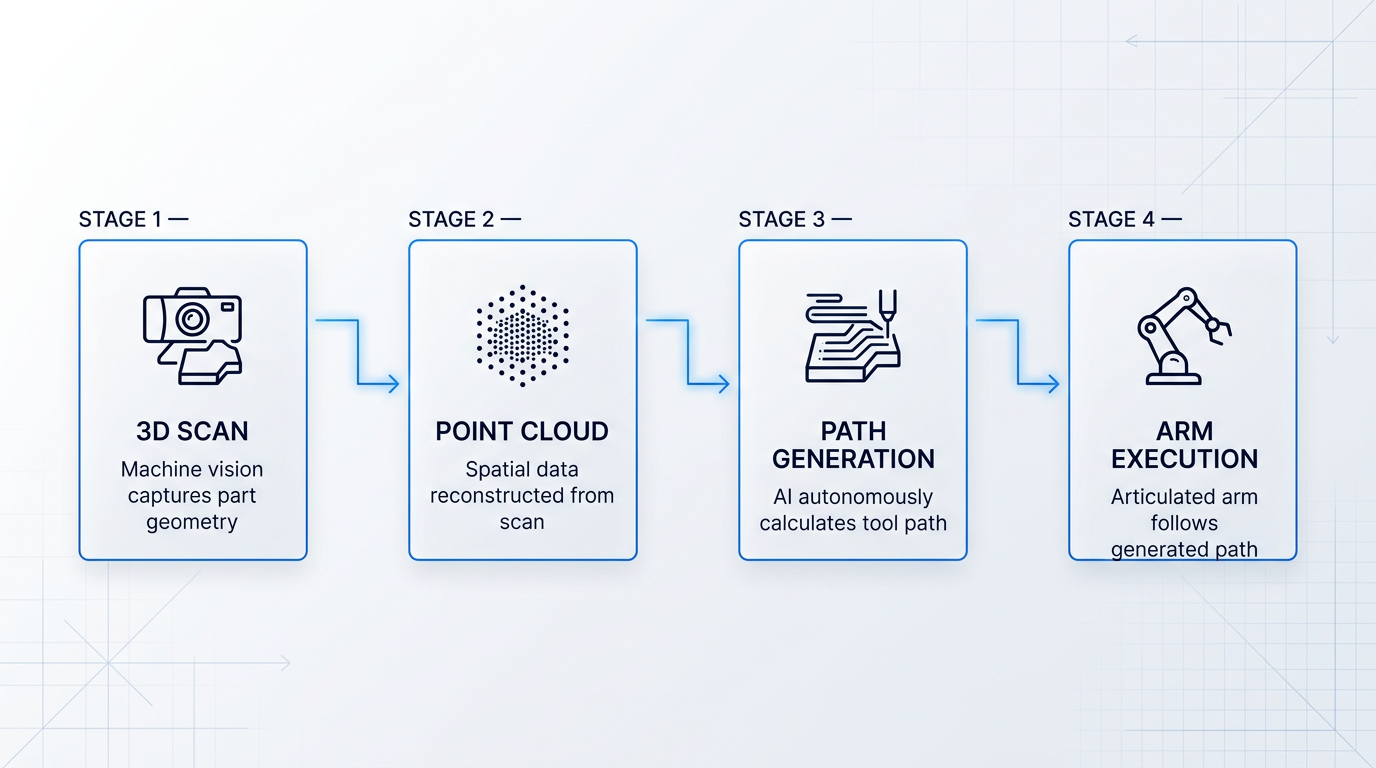
This is the direction industrial automation is moving: systems that derive their own operating instructions from what they observe, rather than executing what a programmer pre-specified.
Sensor Fusion: A Richer Model of Physical Interaction
Sensor fusion combines multiple input modalities to give the arm a more complete model of its interaction with the world than any single sensor can provide.
- Joint encoders (proprioception): Report the arm's own configuration — position and velocity at each joint. The baseline input every arm already has.
- Force-torque sensors: Measure contact forces and torques at the wrist, enabling compliant manipulation: assembly with tight tolerances, surface finishing with consistent applied force.
- Vision (depth and 2D): Provides environmental geometry and global context — what force sensors cannot supply. Guides approach and grasp planning.
- Tactile sensing: Captures surface contact distribution and incipient slip at fine spatial resolution, complementing vision under occlusion.
Force-torque sensing is particularly consequential for AI-driven manipulation. Research on diffusion policies trained with force-torque data demonstrates 100% success rates on tight-clearance assembly tasks under nominal conditions — the kind of contact-rich, sub-millimetre work that vision alone cannot reliably guide. As covered in the collaborative robots section, force-torque sensing also underpins contact-detection safety; the same capability that stops an arm when it meets unexpected resistance is what enables it to apply consistent, controlled force during finishing operations.
Fusing vision and force adaptively — suppressing force signals during free motion and weighting them heavily during contact — has been shown to outperform single-modality policies by meaningful margins on contact-rich tasks, with published results showing a 14% improvement in success rate over the strongest single-modality baseline.
Vision-Language-Action Models: The Research Frontier
The furthest edge of this technology is Vision-Language-Action (VLA) models — large multimodal architectures that unify visual perception, natural language understanding, and motor control within a single learned framework.
The capability they target: a robot that can interpret a high-level instruction such as "pick up the red part" and generate appropriate motion without explicit programming — bridging semantic understanding and physical action through end-to-end learning rather than modular, hand-coded pipelines.
Architecturally, VLA systems combine a vision encoder (processing raw image observations into structured representations), a language backbone (integrating multimodal context and reasoning), and an action decoder (translating that output into executable robot control commands). Models including RT-2, OpenVLA, and π₀ represent different points in the design space, with benchmarking showing that π₀ demonstrates superior adaptability in out-of-distribution scenarios while more task-specific models such as ACT offer higher stability on familiar tasks.
Accuracy on maturity is important here: VLA models are still largely a research-stage technology, not production-deployed at scale. Persistent challenges include contact precision (near-miss grasps and premature releases remain common failure modes), real-time inference latency, and the gap between simulation performance and real-world transfer. They represent the longer-term direction of adaptive robotic manipulation — not a capability available off the shelf today.
A Generational Shift, Not an Incremental Upgrade
The distinction between first-generation programmed arms and next-generation vision-and-AI-driven systems is structural, not a matter of degree. The Deloitte Physical AI report frames this as machines moving from executing predetermined processes to autonomously interacting with, interpreting, and making decisions within physical environments — with real-world feedback loops replacing scripted waypoints.
Three things change concretely when an arm gains perceptual and learning capabilities.
- Who can deploy it: When the system generates its own paths from a scan, no specialist programmer is needed. Anyone can load a part and run it.
- What tasks it can handle: Variable geometry, unstructured environments, and randomly oriented objects — scenarios that defeat classical programming — become tractable.
- How quickly it redeploys: No reprogramming cycle between part changeovers. The system adapts to the new part at scan time, not at programming time.
With 22% of manufacturers surveyed by the Manufacturing Leadership Council confirming plans to adopt physical AI within two years, this shift is moving from research discussion to procurement decision.
For vision-driven AI systems, the question is no longer only what the arm can do — it is who can operate it, how quickly it can be redeployed, and whether it works without a specialist programmer in the loop. These are engineering capabilities, not convenience features.
With the full landscape now covered — from the mechanical fundamentals of joint types and degrees of freedom through to the AI-driven frontier — the final question is how to bring it all together into a selection decision that fits your specific task, environment, and operational constraints.
Conclusion
Choosing the Right Robotic Arm
Knowing the names of arm types is a starting point, not a selection strategy — what actually equips you to choose is understanding why each kinematic structure produces the workspace geometry and mechanical trade-offs it does.
With that reasoning in place, the rest of the framework follows: payload, reach, repeatability, and environment narrow the field, and the industrial-versus-cobot question resolves as a deployment philosophy rather than a safety checkbox.
From here, the natural next step is applying that framework to your specific task requirements — and, for those going deeper, exploring the simulation tools and programming ecosystems covered earlier.
Frequently Asked Questions About Robotic Arms
Practical answers to the most common questions about robotic arm technology — covering cost, configuration, safety architecture, end-effectors, and programming accessibility.
Robotic arm costs span an enormous range. Entry-level collaborative arms (cobots) typically start at roughly USD 25,000–35,000 for the arm alone, with complete deployed systems — including controller, end-of-arm tooling, integration, and training — often reaching USD 80,000–150,000. Industrial articulated arms for lighter payloads begin at a similar level, while heavy-payload configurations can run to several hundred thousand dollars. Research and educational arms are available for considerably less. The arm itself, however, is only part of the picture. Integration engineering, programming, safety assessment, installation, and ongoing maintenance are frequently underestimated: one widely cited figure puts the arm at roughly 40–50% of total deployment cost, with the remaining 50–60% covering everything else. For industrial buyers, total cost of ownership over a 10–15 year lifespan — factoring in labour savings, energy, maintenance, and consumables — is a far more meaningful metric than purchase price alone. A system that costs more upfront may pay back faster if it runs reliably at higher throughput with lower ongoing costs.
It depends entirely on the task. Six degrees of freedom (DOF) is the standard minimum for general-purpose work: three axes position the end-effector in space, and three more control its orientation, meaning the arm can reach any point in its workspace and approach it from any direction. A properly designed 6-DOF arm can achieve any position with any orientation within its reach envelope. Seven DOF adds a redundant axis — the arm can reconfigure its own posture (shifting the elbow, for instance) while keeping the end-effector perfectly stationary. This is valuable when working around obstacles or in confined spaces, and is the configuration used by Canadarm2 on the International Space Station and research platforms such as the Franka Research 3. Fewer DOF is entirely sufficient for constrained tasks: SCARA robots operate with 4 DOF for planar pick-and-place, and delta robots use 3–4 DOF for high-speed packaging. More DOF adds cost and control complexity. The right number is determined by task geometry, not by a preference for capability headroom.
The core distinction is safety architecture and deployment philosophy, not size or speed. Cobots are designed from the ground up to share a workspace with human workers. They achieve this through power-and-force limiting (integrated torque sensors that stop the arm on contact), speed and separation monitoring, and rounded low-inertia geometry — meaning a collision is survivable rather than dangerous. The vast majority of cobots operate without safety cages. Industrial robots, by contrast, are designed for segregated, fully automated cells where humans are excluded during operation. They operate at higher speeds and carry heavier payloads, but require fixed guarding and safety infrastructure to do so safely. A cobot is not simply a smaller industrial robot. It is a system built around human co-presence, which is why it trades a lower speed and payload ceiling for that flexibility. The choice between them is a deployment philosophy decision: if human workers need to enter the work cell, interact with parts, or redeploy the arm frequently between tasks, a cobot is typically the right architecture. If the process is fixed, high-volume, and fully automated, a traditional industrial robot will usually outperform it.
End-effectors are entirely task-specific — there is no single answer. The end-effector is the device attached to the arm's wrist that allows it to interact with its environment, and it is a separate selection decision from the arm itself. The arm-and-end-effector combination together defines what the system can actually do. The main categories are: grippers (mechanical, pneumatic, vacuum/suction cup, or magnetic) for pick-and-place and handling; welding torches for arc or spot welding; material removal tools such as drilling spindles, deburring heads, and cutting tools for aerospace and automotive applications; force-torque sensors mounted between the wrist and tool for compliant assembly, insertion, and sanding tasks; and specialised tools including paint guns and inspection cameras. Tool changers are a particularly important category: these devices allow a single arm to switch automatically between different end-effectors during a production cycle, enabling one robot to perform multiple operations without manual intervention. ATI Industrial Automation, for example, produces robotic tool changers rated for millions of cycles at full load while maintaining high repeatability — a key enabler of flexible manufacturing.
Yes — increasingly so, and programming accessibility has become a genuine selection criterion. Most cobots and many modern industrial arms support graphical, node-based programming interfaces that require no coding at all. Universal Robots' PolyScope, for instance, lets operators build programs by selecting and ordering nodes through a touch-screen interface, with no scripting required. ABB's Wizard Easy Programming takes a similar drag-and-drop block approach and is available for both cobots and six-axis industrial robots. Hand-guided teaching goes further still: on most cobots, an operator can physically move the arm along the desired path and the system records the motion, ready to replay it. This requires no programming whatsoever. At the other end of the spectrum, ROS (Robot Operating System) is an open-source framework widely used in research and advanced development that does require programming competence — primarily in C++ or Python. ROS offers powerful tools and libraries for building sophisticated robotic applications, but it is not aimed at shop-floor operators. For most industrial deployments, the graphical interfaces and hand-guided teaching options available today make getting a cobot running a matter of hours rather than weeks.