

Introduction
If you have an EDFA datasheet open right now, you already know the problem: the numbers are all there, but the datasheet won't tell you what they mean for your system.
Specifications without context are just figures on a page — and context is exactly what datasheets leave out.
This guide works through every major parameter category you'll encounter, with the system-level reasoning that turns raw specs into decisions you can actually stand behind.
It's written for engineers and technical buyers who know their way around optical systems — not a photonics primer, but a practical reading framework for the evaluation you're already in the middle of.
TL;DR
Getting value from an EDFA datasheet isn't about finding the highest numbers — it's about understanding what each parameter means for the role that amplifier will play in your specific system. The same spec that looks excellent in one context can be a liability in another, and knowing the difference is what separates a confident selection from an expensive assumption.
This article covers:

Operating modes and how they shape every specification
Gain: small-signal gain, range, stability
Noise figure and link budget planning
Output power: saturated, nominal, input range
Gain flatness and wavelength range for WDM
Interfaces, compliance, and customisation options
What Is an EDFA Datasheet?
An EDFA datasheet can tell you the gain, the noise figure, the output power — and still leave you unable to answer the question that actually matters: is this the right amplifier for my system? The numbers are real, but their meaning is inseparable from context.
An EDFA datasheet is a structured specification document issued by a manufacturer that lists the measurable performance parameters of a specific amplifier product under defined operating conditions. It is a product document, not a technology tutorial — it tells you how a particular device performs, not how erbium-doped fibre amplification works in general.
Most EDFA datasheets follow a consistent structure across manufacturers. The core of the document is an optical specifications table, listing parameters such as gain, noise figure, output power, gain flatness, and operating wavelength range. Supporting sections cover electrical and environmental specifications (supply voltage, power consumption, operating temperature), compliance and certification markings, mechanical dimensions, and an ordering table that maps part numbers to specific gain and power configurations.
Some datasheets also include application notes or reference diagrams — but these are supplementary. The optical specifications table is where procurement decisions are made, and it is where interpretation matters most.
The Three EDFA Operating Modes
The single most important question to answer before reading any EDFA datasheet is: what operating mode is this amplifier designed for? ITU-T G.661 formally classifies optical amplifiers into power amplifiers (boosters), pre-amplifiers, and line amplifiers — and each role creates a fundamentally different set of requirements from the datasheet.
- Booster amplifier: Placed after the transmitter to raise launch power into the fibre span. High input power, high output power, moderate gain. Noise figure is less critical — output power is the dominant specification.
- In-line amplifier (ILA): Placed periodically along the span, typically every 80–100 km, to compensate for fibre attenuation. Both high gain and low noise figure are critical, as ASE noise accumulates across cascaded spans.
- Pre-amplifier: Placed immediately before the receiver to boost a weak signal before detection. Very low input power. Noise figure is the dominant specification — it directly sets the receiver sensitivity floor.
These three roles create three fundamentally different evaluation frameworks. A booster with a strong output power specification and a mediocre noise figure may be exactly right for its application — but that same noise figure would be disqualifying in a pre-amplifier, where the NF directly determines how well the receiver can detect a weak signal.
The same logic applies in reverse: a pre-amplifier optimised for ultra-low noise at very low input powers is not designed to deliver the saturated output power a booster application demands. The headline gain figure may look similar across two datasheets, but the amplifiers are built for entirely different jobs.
Identifying the amplifier's intended operating mode is always the first step when reading an EDFA datasheet — every other parameter's significance follows from it.
This principle governs the rest of this guide: no parameter should be read in isolation. Always ask which operating mode the amplifier is designed for, and what a given number means within that context. With that interpretive lens in place, the logical starting point is the gain specification — and understanding what gain figures on an EDFA datasheet actually tell you about amplifier capability.
Reading Gain Specifications on an EDFA Datasheet
Gain is almost always the first number you see on an EDFA datasheet — and almost always the most misread. The headline figure looks authoritative, but it describes the amplifier under a specific, idealised condition that may bear little resemblance to how the device actually operates in your system.
That headline figure is the small-signal gain: defined by ITU-T G.661 as the gain of the amplifier when operated in the linear regime, where it is essentially independent of the input signal optical power at a given signal wavelength and pump power level. In plain terms, it is the gain measured at low enough input powers that the amplifier is not being pushed toward saturation — the cleanest, most favourable gain the device can produce.
As input power rises, that clean picture changes. The amplifier moves out of the linear regime and undergoes gain compression: the gain begins to fall below its small-signal value. At sufficiently high input powers, the amplifier saturates, and what you are dealing with is large-signal gain — a lower figure that reflects the actual operating point rather than the best-case measurement condition.
The practical implication is straightforward: the small-signal gain on a datasheet is a ceiling, not a guarantee. Which value is relevant depends entirely on where in the system the amplifier sits and what input power it will actually see.
Typical Gain Ranges by Amplifier Role
The three operating modes established earlier — booster, in-line (ILA), and pre-amplifier — each occupy a distinct gain territory, and commercial datasheets reflect this clearly.
| Amplifier Role | Typical Small-Signal Gain Range | Input Condition | Primary Design Priority |
|---|---|---|---|
| Booster | 15–26 dB | Moderate to high input power (e.g. −6 to +3 dBm) | Maximum output power |
| In-Line / ILA | 20–30+ dB | Low to moderate input power | Balance of gain, NF, and output power |
| Pre-Amplifier | 30–45 dB | Very low input power (e.g. −45 to −25 dBm) | Minimum noise figure; maximum sensitivity |
Comparison of typical small-signal gain ranges by EDFA operating role, grounded in commercial datasheet evidence and technical references.
The pattern is clear: gain increases as input power decreases. Booster amplifiers receive a relatively strong signal from the transmitter and add moderate gain to raise launch power — Cisco's ONS 15454 booster variants, for example, specify maximum gains of 17 dB and 24 dB respectively. Pre-amplifiers at the other end of the chain operate on weak signals and must deliver high gain with minimal added noise; vendors such as Simtrum document small-signal gains of 35–45 dB for PA-type units handling inputs as low as −45 dBm. The Thorlabs EDFA300 series, designed for high-gain applications, specifies small-signal gain of greater than 40 dB at −20 dBm input.
This is why comparing a 17 dB booster figure against a 40 dB pre-amplifier figure is meaningless without context: they are not competing claims, they are descriptions of different jobs.
Gain Range: Standard, Extended, and the Trade-Offs
Many datasheets specify a gain range rather than a single gain value — for example, the Cisco ONS 15454 EDFA-17 lists a standard gain range of 5 to 17 dB, while the EDFA3 specifies a standard range of 5 to 21 dB and an extended range of 21 to 38.5 dB. The gain range tells you how far the amplifier's gain can be adjusted, which matters for system margin planning and for accommodating different span lengths or channel loading conditions.
The distinction between a standard gain range and an extended gain range is worth scrutinising carefully. On the Cisco EDFA3 and the ONS 15454 amplifiers, gain flatness control operates only within the standard range; in the extended range, the amplifier cannot control gain tilt, and a finite tilt is introduced. The full optical performance specifications — gain ripple, tilt accuracy, noise figure mask — typically apply only across the standard range.
Operating at the low end of the gain range also carries a noise penalty. Noise figure degrades as gain is reduced, a trade-off that will be examined in detail in the next section — but it is worth flagging here as a reason not to routinely operate at the minimum of the specified gain range without checking the NF mask.
Gain Set Resolution, Accuracy, and Stability
Beyond the headline gain value and its range, three further datasheet parameters govern how precisely and reliably the amplifier delivers the gain you set. They are distinct specifications, and engineers should look for each one separately.
- Gain Set Resolution: The smallest increment by which gain can be commanded — typically 0.1 dB in carrier-grade EDFAs (confirmed on both the Cisco EDFA3 and NCS 2000 EDFA-35). Finer resolution allows more precise control of channel power and system margins.
- Gain Accuracy: How close actual gain is to the commanded set-point, expressed as ±X dB. The Cisco ONS 15454 amplifiers specify a gain tilt error of ±0.5 dB — the tolerance band around the target gain value.
- Gain Stability: How much gain drifts once set, over time or with temperature change. The Cisco ONS 15454 and NCS 2000 EDFA-35 both specify short-term gain stability of ±0.1 dB — the amplifier holds its set gain without constant recalibration.
Gain accuracy and gain stability address different failure modes. A low-accuracy amplifier delivers the wrong gain from the moment you set it; a low-stability amplifier may start correctly but drift over time. Both matter for long-term system performance, and both should appear as explicit line items on the datasheet — not assumed to be the same specification.
A 17 dB booster gain and a 40 dB pre-amplifier gain are not competing figures — they describe different roles in the system. Before comparing any two gain numbers on EDFA datasheets, confirm you are looking at amplifiers designed for the same operating mode.
Gain, however, is only half of the signal quality picture. The parameter that arguably matters most for what the signal looks like after amplification is noise figure — and noise figure is directly coupled to gain in ways that make it the essential next lens for reading any EDFA datasheet.
Noise Figure: the Parameter That Matters Most for Signal Quality
The same noise figure value can be almost irrelevant in one part of a link and genuinely link-limiting in another — which makes it one of the most context-dependent parameters on any EDFA datasheet.
Per ITU-T G.661, noise figure is defined as the decrease in signal-to-noise ratio at the output of an optical detector resulting from propagation through the amplifier, expressed in dB. It is a positive number by convention: a higher NF means worse performance.
The physical root cause is amplified spontaneous emission (ASE): photons emitted spontaneously by excited erbium ions that are then amplified alongside the signal, adding broadband optical noise that directly degrades OSNR. ASE is an inherent consequence of optical amplification, not a manufacturing flaw that can be eliminated.
To calibrate what you see on a datasheet: the quantum-limited minimum for an ideal optical amplifier is 3 dB. In practice, commercial EDFAs pumped at 980 nm typically achieve 4–6 dB NF, while those pumped at 1480 nm typically fall in the 6–7 dB range. Any figure outside these bands warrants scrutiny of the measurement conditions.
How Operating Role Shapes NF Importance
- Booster amplifier: NF is least critical here. The signal enters at high power, so ASE contributes a relatively small fraction of total noise. A higher NF is often acceptable.
- In-line amplifier (ILA): NF becomes a dominant factor. The signal arrives attenuated after each span, and ASE noise from every ILA accumulates across the chain.
- Pre-amplifier: NF is the most critical parameter. The signal is at its weakest, and ASE from this stage sets the noise floor directly seen by the receiver.
The asymmetry here is significant: a 6 dB NF figure in a booster application may be perfectly acceptable, whereas the same figure in a pre-amplifier could be the deciding factor in whether the link closes.
In a multi-span link, ASE noise accumulates additively through the in-line amplifier chain — each ILA contributes its own noise floor on top of what preceded it. A 0.5 dB improvement in NF per amplifier, applied across 10 or 20 spans, is not a marginal difference on paper: it translates into meaningful OSNR headroom at the receiver that determines whether your target modulation format remains supportable.
A 0.5 dB NF advantage per amplifier accumulates across every span in the chain. Over 20 spans, that difference can represent several dB of OSNR margin at the receiver — enough to determine whether a high-order modulation format remains viable.
There is also a fundamental trade-off to account for: higher gain settings generally produce higher NF. A single NF figure on a datasheet is only meaningful at the gain setting where it was measured, and vendors typically report the headline figure at or near maximum gain — which may not reflect your operating point.
As with gain, the right habit is to read NF at your intended operating gain, not at the datasheet's test conditions. Check whether the datasheet provides an NF-versus-gain curve or table; if it does not, request one from the vendor before committing to a procurement decision.
The same discipline applies to input power conditions: the stated NF is measured at a specific input power level, and if your operating point differs materially, the actual in-service NF may be higher. The footnotes and conditions table accompanying the NF specification are not boilerplate — they define the validity boundary of the number.
Ultimately, the datasheet NF figure is an input to your OSNR calculation, not a standalone verdict on amplifier quality. A lower NF contributes to better OSNR at the receiver, which in turn determines whether a given bit rate and modulation format can be sustained over the link — making NF a direct lever in link budget engineering, not just a component specification.
With gain and noise figure established, the next specification to interpret is output power — and, as with NF, the amplifier's operating role fundamentally changes what the number means and how it should be evaluated.
Reading Output Power Specifications on an EDFA Datasheet
Output power looks like the simplest figure on an EDFA datasheet — one number, in dBm, right at the top of the spec table. The trap is that this single number can represent at least three fundamentally different quantities, and its engineering meaning shifts completely depending on the amplifier's operating role and how many channels it is carrying.
The Three Output Power Figures
Every EDFA datasheet worth reading distinguishes between saturated output power (Psat), nominal output signal power, and maximum total output power — but many present only one or two of these, leaving the reader to infer the rest.
| Parameter | Definition | Engineering Role | What to Check on the Datasheet |
|---|---|---|---|
| Saturated output power (Psat) | Output power at which gain has compressed by 3 dB relative to small-signal gain (per ITU-T G.661). | Capability boundary — indicates headroom, not operating target. Running at Psat means gain is already degraded. | Confirm this is a 3 dB compression figure, not labelled ambiguously as 'max output power'. |
| Nominal output signal power | Specified output power under nominal input power and gain conditions — the amplifier operating as designed. | Working figure for link budget calculations. This is the power the system actually relies on. | Note the input power and gain conditions under which this figure is specified — it is condition-dependent. |
| Maximum total output power | Absolute maximum optical power at the output port, typically listed under absolute maximum ratings. | Safety and compliance ceiling. Exceeding it risks damage to downstream components or a laser safety hazard. | Treat as a hard limit, not an operating target. Verify against IEC 60825 class requirements if relevant. |
Comparison of the three distinct output power figures on an EDFA datasheet — definition, engineering role, and what to verify when reading a spec sheet.
The distinction between Psat and nominal output power is the one most often collapsed on datasheets — and the one that causes the most link budget errors.
Psat is the amplifier's capability boundary: it tells you where gain compression has already set in, not where you should be operating. As covered in the gain parameters section, gain falls as input power rises; Psat is simply the output level at which that compression has reached 3 dB — a degraded state, not a design target.
Nominal output power, by contrast, is the figure that belongs in your link budget — the power the amplifier delivers when operating as specified, at the stated input power and gain setting.
Input Power Range
The input power range defines the span of input signal levels over which the amplifier meets all of its published specifications — gain, noise figure, and output power simultaneously.
- Minimum input threshold: Below this level the amplifier is under-driven: gain and noise figure degrade and the output power figure on the datasheet no longer applies.
- Maximum input limit: Above this level the amplifier saturates or risks damage. Gain compresses and output power becomes unpredictable.
For system margin planning, the input power range matters most when the amplifier will be fed from a variable-power source — for example, a fibre span whose loss changes with temperature or degrades over its service life.
If the span loss at end-of-life pushes the received signal below the amplifier's minimum input threshold, the published specifications are void and the link margin calculation built around them is invalid.
Operating Mode Changes What the Number Means
The same output power figure carries entirely different engineering meaning depending on where the amplifier sits in the link — and this is the interpretive point that datasheets almost never make explicit.
A booster amplifier output power figure is a fibre launch power: it sets the signal level entering the span and must be evaluated against the span loss budget and the in-line amplifier's input power range.
The same figure on a pre-amplifier datasheet is the power delivered to the receiver — a figure that must be evaluated against the receiver's sensitivity and dynamic range, not against the span.
For an in-line amplifier (ILA), output power determines the launch level into the next span and must be matched to both the downstream span loss and the next amplifier's input power range.
A +23 dBm output power specification is a launch budget figure on a booster, a receiver drive level on a pre-amp, and a mid-span restoration figure on an ILA. Reading it without knowing the amplifier's role in the link will produce the wrong engineering conclusion every time.
Single-Channel vs. Full DWDM Load
Many datasheets specify output power under two conditions: single-channel loading and full DWDM channel load. The headline figure is almost always the single-channel number — and for WDM system design, it is almost always the wrong one to use.
At full DWDM load, the amplifier's total output power is shared across all channels, so per-channel power is substantially lower than the headline figure suggests.
The relationship is straightforward: for a 40-channel DWDM system with a single-channel output of +23 dBm, the per-channel power at full load is approximately +23 − 10·log₁₀(40) ≈ +7 dBm — a 16 dB reduction that will invalidate any link budget built around the headline figure.
More generally, the formula connecting single-channel output and multi-channel Psat is: Psat (dBm) ≈ single-channel output (dBm) + 10·log₁₀(N), where N is the number of channels.
As a quick sanity check: if a datasheet shows a single-channel input of −10 dBm with 30 dB gain, the single-channel output is +20 dBm; for a 40-channel system, the required Psat is approximately +20 + 16 = +36 dBm — a figure you can check directly against the datasheet's Psat specification.
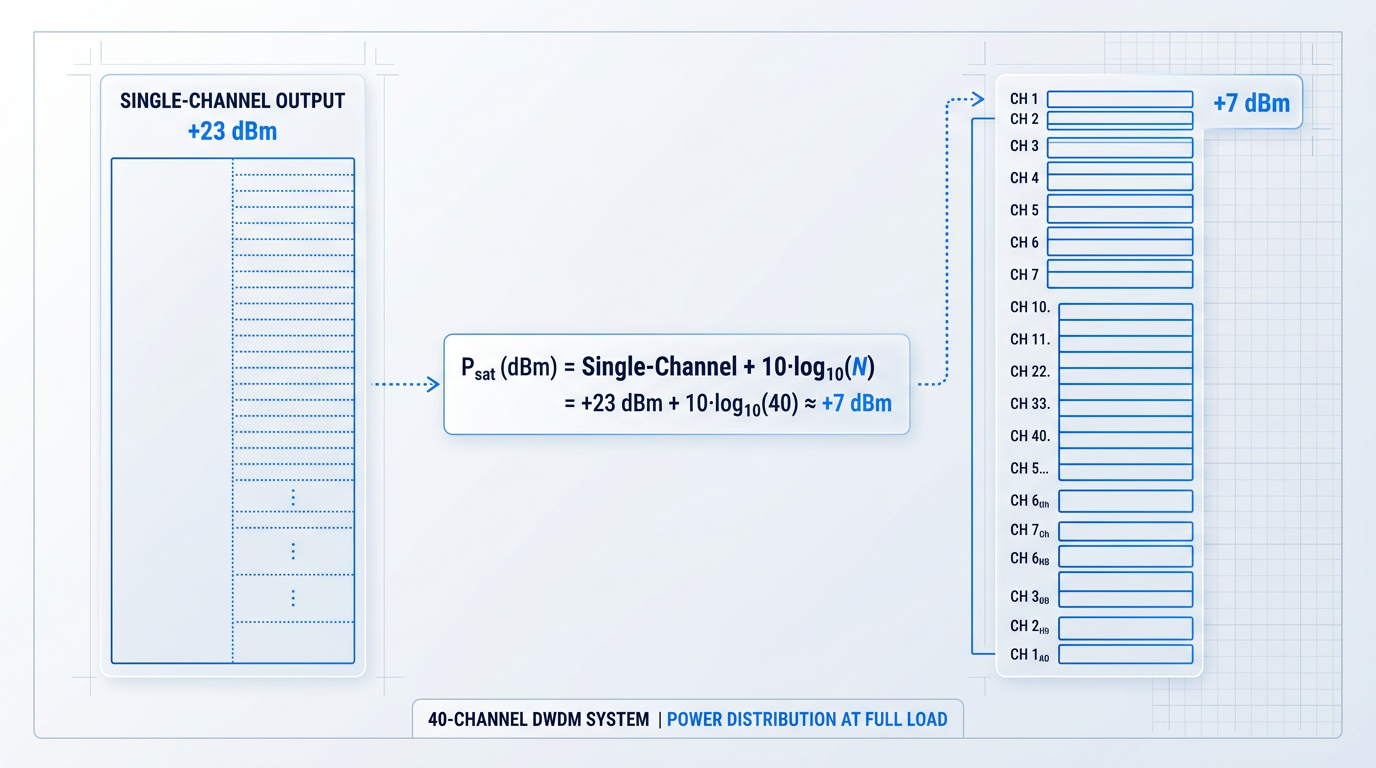
The operationally relevant figure for WDM system design is always the per-channel power at full channel load — not the total output power at single-channel loading that typically leads the datasheet.
With output power and its channel-loading dependence understood, the next question is how that power is distributed across the wavelength band — which channels receive more, which receive less, and by how much. That is what gain flatness and operating wavelength range address.
Gain Flatness and Wavelength Range: WDM Implications
Every parameter covered so far — gain, noise figure, output power — describes the amplifier at a point. Gain flatness and operating wavelength range describe something harder to see and more consequential in multi-span DWDM: what the amplifier does across the spectrum, and whether it does it equally well for every channel in your plan.
The erbium gain profile in a C-band EDFA is inherently non-uniform, with amplitude peaks near 1530 nm and around 1560 nm and a relative trough between them — a differential that can reach several dB at low input powers without any flattening treatment.
In a single-channel system, that non-uniformity is irrelevant. In a WDM system, channels sitting at different points on the gain spectrum receive different levels of amplification, creating unequal channel powers at the output of every amplifier span.
The compounding effect is the real system-level concern: a per-amplifier power imbalance of even 1 dB grows into a serious OSNR disparity across 10 or 20 cascaded spans, pushing some channels into nonlinear penalty territory while others fall below the receiver sensitivity floor.
On an EDFA datasheet, the gain flatness figure quantifies this spectral variation as the peak-to-peak gain variation in dB across the specified wavelength range. Watch for notation inconsistency: a spec written as ±0.5 dB and one written as 1 dB peak-to-peak are expressing the same total variation — the ± form is half the peak-to-peak value, not the full swing.
Gain-flattening filters: the trade-off behind the spec
The standard engineering response to the non-uniform gain problem is a gain-flattening filter (GFF) — a passive optical filter, typically inserted at the mid-stage of a two-stage amplifier design, whose spectral loss profile is the inverse of the erbium gain curve.
By attenuating the gain peaks down toward the trough level, the GFF equalises channel powers across the band. As Lightwave Online's coverage of passive EDFA components notes, gain-flattening filters use filter elements with EDFA inverse gain curves to flatten the double-peaked output spectrum, and they are often customised to match the gain characteristics of a specific amplifier design.
The trade-off is insertion loss: the filter attenuates all channels, not just the peaks, which reduces total output power and increases the effective noise figure. Lightwave Online's modelling analysis notes that mid-stage placement is specifically chosen to mitigate this — locating the filter loss at the amplifier input would degrade NF by 1–2 dB, while placing it at the output would degrade output power by the same margin.
When you see a very flat gain flatness spec on a wide-band product, the datasheet is implicitly encoding this trade-off: the flatness was achieved at a cost to output power and NF that may or may not be visible in the headline figures.
How to read the gain flatness spec
Four things to check when interpreting a gain flatness figure on any EDFA datasheet:
- Wavelength range covered: Flatness over 1530–1560 nm is a narrower and easier claim than flatness over 1530–1565 nm. The range must match your channel plan, not just nominally overlap it.
- Operating conditions stated: The spec should state input power level, gain setting, and channel count. A flatness figure measured at one gain setting may not hold at another — gain variations increase as input power decreases.
- Notation convention used: Confirm whether the figure is peak-to-peak or ±half-peak-to-peak. Normalise before comparing datasheets that use different conventions.
- Single-channel vs. full-load: A flatness spec measured with a single test channel may differ from performance under a full channel load. Check whether the conditions reflect your intended deployment.
The operating conditions caveat matters more than it might appear. Thorlabs' datasheet documentation for its EDFA100 series explicitly states that gain flatness at −10 dBm input improves from approximately 3 dB without a GFF to less than 0.5 dB with one, while at −20 dBm the unfiltered variation rises to approximately 8.5 dB — the same product, a very different flatness figure depending on where in the operating range you measure it.
FS.com datasheets, by contrast, typically state gain flatness as a single Typ/Max value — for example, 1 dB typical and 1.5 dB maximum — without specifying the input power or gain setting at which those figures apply, which means the reader cannot directly compare them to a Thorlabs-style conditional spec without additional information.
This inconsistency in how vendors present measurement conditions is one of the more practical friction points when comparing datasheets across suppliers: the flatness number alone is not enough without knowing the operating point it was measured at.
C-band, L-band, and channel count
The C-band (conventional band) spans approximately 1530–1565 nm — a 35 nm window that encompasses the primary erbium gain region. The L-band (long-wavelength band), defined by ITU-T as approximately 1565–1625 nm, extends capacity beyond the C-band by exploiting the tail of the erbium gain spectrum, though L-band EDFAs require longer erbium-doped fiber lengths.
L-band gain ripple is also substantially lower than in the C-band: Lightwave Online's L-band amplifier analysis reports that C-band gain ripple typically runs 4–6%, while a prototype L-band amplifier demonstrated 1.4% ripple — an order-of-magnitude difference in percentage terms that makes L-band GFFs easier to manufacture and less performance-degrading than their C-band equivalents.
The ITU-T G.694.1 DWDM frequency grid, anchored at 193.1 THz, defines channel spacing across both bands without specifying normative per-band channel counts or grid endpoints. As an indication, the ITU-T handbook notes that approximately 40 channels at 100 GHz spacing can occupy the conventional C-band (1530–1565 nm), with that count approximately doubling at 50 GHz spacing.
The practical implication is that 'C-band' is not a uniform specification across vendors: some datasheets cover 1528–1564 nm, others 1529–1561 nm, others the full 1530–1565 nm window. Verify that the datasheet's stated range covers your intended channel plan with margin, not just nominal overlap — a plan built on 80 channels at 50 GHz spacing has no room for a wavelength range that clips the first or last few ITU grid slots.
A gain flatness spec of 1 dB over 30 nm and a spec of 1.5 dB over 35 nm are not directly comparable — the wider range is a harder engineering problem. Always evaluate flatness relative to the wavelength window it covers, and check that window against your actual channel plan before drawing any conclusions about which product is better specified.
Some datasheets also specify gain tilt as a parameter separate from flatness. Where flatness captures the full peak-to-peak spectral variation including ripple, gain tilt describes a systematic slope across the band — the gain at the short-wavelength end relative to the long-wavelength end, typically expressed in dB or dB/nm. As Lightwave Online's coverage of next-generation network designs notes, gain tilt is a function of pump power and changes with gain setting, making it a dynamic concern in systems with variable channel loading.
Some products offer tilt control capability — adjustable tilt compensation that allows the operator to pre-set or dynamically correct for the slope — which may appear as a separate parameter on the datasheet. Tilt and flatness are related but not equivalent: a product with low ripple flatness can still exhibit significant tilt, and vice versa.
With spectral performance covered — how the amplifier behaves across its full wavelength range, not just at a single operating point — the remaining signal integrity parameters on a datasheet address a different dimension of amplifier performance, starting with polarisation-dependent effects.
See These Parameters on a Real EDFA Datasheet
Put the theory to work. Download a real EDFA datasheet and see how gain, noise figure, output power, and gain flatness are specified in practice.

Polarisation-Dependent Gain and Signal Integrity Parameters
Beyond the headline figures — gain, noise figure, output power, gain flatness — every serious EDFA datasheet carries a second tier of optical parameters that collectively protect signal integrity against polarisation effects and back-reflections. These numbers are easy to overlook, but in the wrong system architecture, they are the ones that bite.
Polarisation-Dependent Gain (PDG)
Polarisation-dependent gain (PDG), defined formally in ITU-T G.661 as the maximum variation of amplifier gain due to changes in the polarisation state of the input signal, is expressed in dB and specified as a maximum value.
EDFAs are inherently nearly polarisation-insensitive, which keeps PDG low by design — ITU-T G.661 notes that EDFA PDG is negligible at around 0.2 dB, and commercial datasheets confirm this: the FS.com 1U rack DWDM EDFA lists PDG ≤ 0.5 dB (typical 0.3 dB), the Edge-Core EDFA specifies a 0.3 dB maximum, and the Cisco Prisma II HD EDFA lists polarisation sensitivity of 0.3 dB.
The contrast with semiconductor optical amplifiers (SOAs) is instructive: ITU-T G.661 Appendix I states that commercial SOA PDG typically runs 2–5 dB, because SOA gain is inherently polarisation-dependent without optimised waveguide design, whereas EDFA gain is not.
For a single-span deployment, a PDG of 0.3 dB is negligible — it will not meaningfully affect system performance, and you can move on.
The picture changes in long cascaded amplifier chains: in multi-span terrestrial or submarine links, even small per-amplifier PDG values accumulate across tens or hundreds of in-line amplifiers, and their interaction with polarisation-dependent loss (PDL) from passive components — connectors, isolators, splitters — progressively degrades OSNR in ways that single-span analysis will not predict.
In a single EDFA, 0.3 dB PDG is inconsequential. Across a cascade of hundreds of amplifiers interacting with PDL from passive components, the cumulative OSNR penalty can become system-limiting — PDG is a parameter to check carefully for any multi-span design, even when the per-amplifier figure looks benign.
When reading PDG on a datasheet, note that it is always expressed as a maximum (e.g. "PDG ≤ 0.5 dB") — lower is better, and values above 0.5 dB warrant further investigation for any multi-span application.
Also check the conditions under which PDG is specified: like most EDFA parameters, it is measured at a defined gain setting and input power level, so a PDG figure quoted at a different operating point than your intended deployment may not reflect real-world behaviour.
PMD, Return Loss, and Pump Leakage
- Polarisation Mode Dispersion (PMD): The differential group delay between the two polarisation eigenstates, in picoseconds. EDFA PMD is typically ≤ 0.5 ps — rarely a limiting factor except in ultra-high-bit-rate coherent systems with tight cumulative PMD budgets.
- Return Loss: The fraction of incident power reflected back from the input or output port, in dB. Higher is better; ≥ 50 dB is common on quality units. Back-reflections can induce noise or instability; angled physical contact (APC) connectors help achieve high values.
- Pump Leakage: Pump laser power emitted from the signal input or output port, specified as a maximum in dBm. Leaked pump light at 980 nm or 1480 nm can interfere with upstream or downstream components and warrants checking in sensitive system integrations.
Of these three, PMD and pump leakage are parameters to note rather than parameters that typically dominate design decisions — polarisation mode dispersion at the 0.5 ps level the FS.com and Edge-Core datasheets specify is well below the threshold that concerns most link budgets, and pump leakage is a check-box item unless you are integrating into a system with particularly sensitive upstream receivers.
Return loss deserves more attention in high-stability deployments: the FS.com and Cisco Prisma II datasheets both specify ≥ 50 dB, while the Edge-Core datasheet specifies a minimum of 40 dB — a meaningful difference for applications where back-reflection stability of upstream sources is a design constraint. Connector choice is a contributing factor here, which the connector section of this guide addresses in full.
With signal integrity parameters understood, the next layer of datasheet evaluation shifts from optical behaviour to system integration: how the amplifier is controlled, monitored, and managed within a network architecture.
Control Interfaces and Operating Modes on EDFA Datasheets
Most EDFA selection processes stall at optical performance — gain, noise figure, output power — and treat the control interface as a detail to sort out later. That instinct is expensive: discovering that an amplifier's management protocol is incompatible with your NMS, or that its operating mode redistributes channel power unexpectedly during a fibre protection switch, is the kind of problem that surfaces after the purchase order is placed.
AGC and APC: Operating Modes and Their System Implications
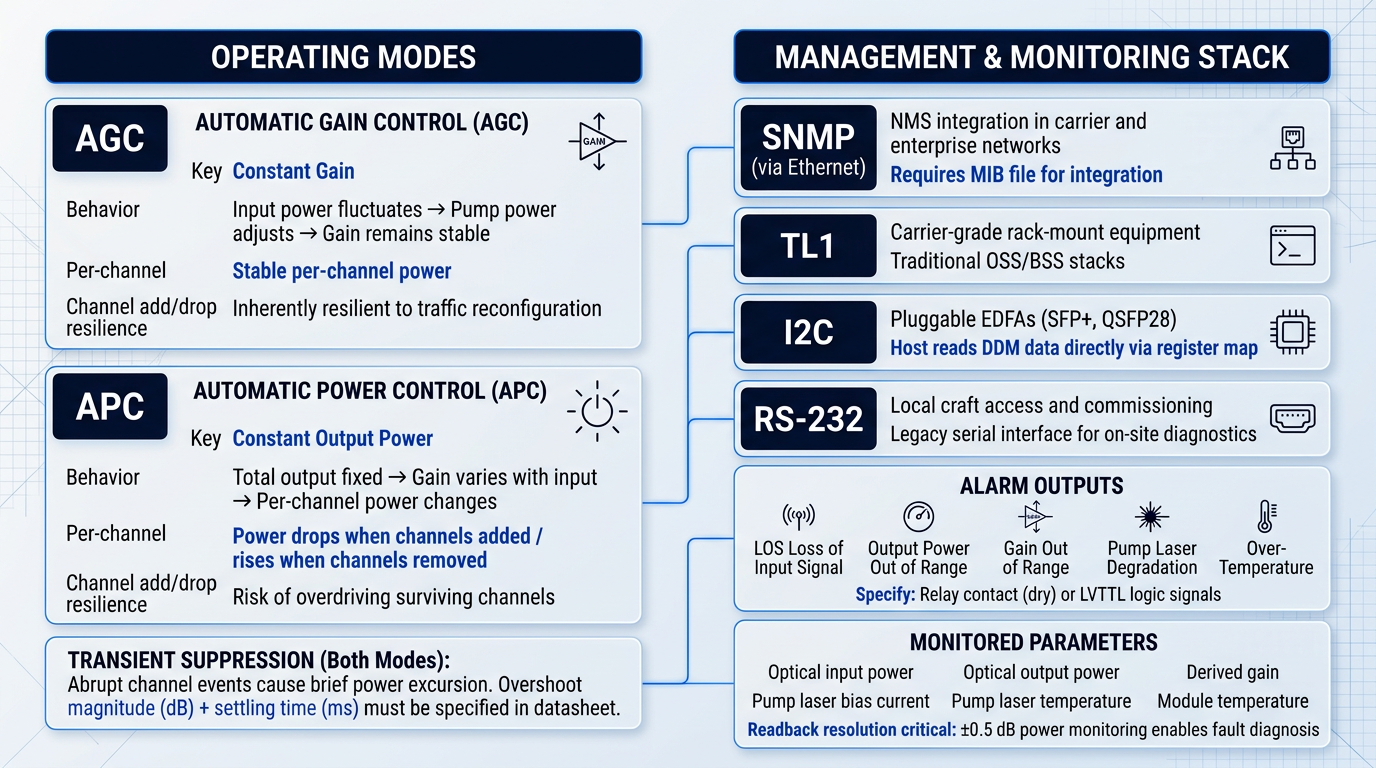
Automatic Gain Control (AGC) holds the amplifier's gain constant regardless of how the input power fluctuates — if input rises or falls, the amplifier adjusts pump power to maintain the same gain ratio.
Automatic Power Control (APC) takes a different approach: it holds total output power constant, letting gain vary as input conditions change.
The downstream implication of this difference becomes clear during WDM channel add/drop events. In constant gain mode, each surviving channel sees the same gain when channels are added or removed — per-channel output power stays stable, and the amplifier is inherently resilient to traffic reconfiguration.
In constant output power mode, the total output is fixed regardless of channel count. Add channels and per-channel power drops; remove channels and per-channel power rises — potentially overdriving surviving channels well above their design operating point.
In constant gain mode, per-channel power is stable across add/drop events. In constant output power mode, per-channel power redistributes every time the channel count changes — a critical distinction for dynamic WDM networks.
Transient Suppression: The Specification Engineers Often Miss
Even in AGC mode, abrupt channel add/drop events cause a brief power excursion on surviving channels before the control loop re-stabilises. This is transient suppression behaviour, and it is distinct from the steady-state operating mode.
The practical consequence is real: a large, slow transient — measured as overshoot magnitude in dB and settling time in milliseconds — can drive surviving channels outside their receiver's operating range long enough to cause bit errors.
Well-specified datasheets quantify both the overshoot magnitude and the settling time. If a datasheet is silent on transient suppression, treat that as a question to put to the vendor before committing — ask for application notes or measured data under realistic channel-count step conditions.
Management Interface Types on EDFA Datasheets
Four management interface types appear regularly on EDFA datasheets, each suited to a different integration context. The relevant question is not which one is best in the abstract — it is whether the amplifier speaks the protocols your NMS expects.
- SNMP (via Ethernet): The standard for NMS integration in carrier and enterprise networks. If the datasheet lists SNMP, ask for the MIB file — without it, integration effort multiplies significantly.
- TL1: Common in carrier-grade rack-mount equipment. Relevant for operators running traditional OSS/BSS stacks where TL1 command sets are already standardised.
- I2C: The host-side interface for pluggable EDFAs (SFP+, QSFP28). Exposes digital diagnostic monitoring (DDM) data to the host platform rather than an independent management plane.
- RS-232: A legacy serial interface for local craft access. Still appears on some rack-mount units, primarily for commissioning and on-site diagnostics rather than operational management.
Pluggable-format EDFAs using I2C operate in a fundamentally different management model from rack-mount units with SNMP or TL1: the host platform reads diagnostic data directly via the module's register map, so there is no independent management IP address or craft port to configure.
Alarm Outputs: What a Complete Datasheet Should List
A well-specified EDFA datasheet documents the alarm conditions the unit can report, not just that alarms exist. The set of conditions to look for includes the following.
- Loss of Input Signal (LOS): Triggered when received optical power falls below the amplifier's minimum input threshold. A fundamental alarm for any traffic-carrying deployment.
- Output power out of range: Indicates the amplifier cannot maintain its specified output — often a sign of pump degradation or an input condition outside the operating envelope.
- Gain out of range: Reported when the control loop cannot achieve the target gain, typically due to an input level beyond the amplifier's dynamic range.
- Pump laser degradation: Flags when pump bias current has risen to compensate for reduced pump efficiency — an early warning of end-of-life before outright failure.
- Over-temperature: Thermal alarm protecting the module from operating outside its rated environment. Critical for deployments in uncooled or poorly ventilated enclosures.
The electrical form of the alarm output matters as much as the alarm list itself. Datasheets typically specify either relay contact outputs (dry contact) or LVTTL logic signals — and these are not interchangeable with external alarm aggregation equipment without the right interface hardware.
If the datasheet lists alarm outputs without specifying their electrical interface, verify this with the vendor before assuming compatibility with your alarm aggregation system.
Monitoring Parameters and Readback Resolution
Beyond alarms, a well-integrated EDFA should expose real-time monitoring data via its management interface. The parameters to look for include optical input power, optical output power, derived gain, pump laser bias current, pump laser temperature, and module temperature.
The resolution of these readbacks is not a cosmetic detail. A power monitoring accuracy of ±0.5 dB is useful for fault diagnosis and performance trending; an unspecified or coarse readback leaves the engineer unable to distinguish a real degradation event from measurement noise.
Datasheets that list monitored parameters without specifying readback resolution are leaving a practical gap — it is worth asking the vendor for the monitoring accuracy figures if they are absent.
With the control and monitoring layer understood, the remaining datasheet specifications to evaluate cover the physical, electrical, and compliance parameters — connector types, power consumption, thermal ratings, and certification markings — that govern procurement decisions and installation planning.
Physical, Electrical, Compliance, and Customisation Specifications
Most engineers spend the bulk of their datasheet review time on the optical performance tables — gain, noise figure, output power — and treat the back pages as administrative formalities. That instinct is understandable, but it is also where procurement problems tend to originate: a connector type incompatible with the existing fibre plant, a power draw that overloads the rack PDU, or a missing compliance marking that disqualifies the product entirely from a European tender.
Physical and Electrical Specifications
The optical connector type is one of the first physical specifications worth checking, and one of the most consequential for compatibility with an existing fibre plant.
The most common connector types on EDFA datasheets are FC/APC, SC/APC, and LC/UPC. The APC (angled physical contact) variants are preferred wherever minimising back-reflections is a priority: the angled end-face suppresses Fresnel reflections far more effectively than a flat UPC polish, which matters for amplifier stability and OSNR in high-power or noise-sensitive applications, as discussed in the signal integrity section earlier in this guide.
Specifying a UPC connector in a high-power EDFA application is not simply a mechanical mismatch — it can introduce reflected light back into the amplifier cavity, degrading performance in ways that are difficult to diagnose in the field. Verify connector compatibility with your fibre plant before ordering, and factor in any adaptor or re-termination costs if the installed plant uses a different polish type.
Power consumption is listed as a maximum draw figure in watts, and the range across EDFA form factors is substantial enough to matter for rack planning.
Pluggable form-factor EDFAs — SFP+ or QSFP28 housings — typically draw under 3 W, making them straightforward to integrate into high-density switching environments. Rack-mount 1U and 2U units with multiple amplified output ports are a different proposition: power consumption in this category commonly ranges from 30 W to over 100 W depending on output power level and channel count.
For high-density deployments with several rack-mount EDFAs per bay, accurate power draw figures from the datasheet are essential inputs for sizing power distribution units and UPS systems — a step that is straightforward to do before procurement and costly to remedy after installation.
The power supply input specification determines whether the amplifier is compatible with your site's electrical infrastructure at all.
Rack-mount units intended for enterprise and data centre environments typically accept AC input across a universal range (commonly 100–240 VAC), while products designed for carrier central office or remote site deployment generally require −48 VDC input, which is the telecom industry standard. Some products offer both, or support redundant power supply modules — a feature worth identifying on the datasheet if your deployment SLA demands high availability.
The operating temperature range defines the ambient conditions within which the amplifier is guaranteed to meet every performance specification on the datasheet.
Commercial-grade products typically specify a range of 0 to +50°C. Products designed for harsher environments — outdoor enclosures, remote huts, or industrial sites — may carry extended ratings such as −20 to +70°C. The critical point for engineers deploying in marginal thermal environments is that the datasheet temperature range is a performance guarantee boundary, not a survival boundary: operating outside it does not necessarily mean the unit shuts down, but it does mean the vendor's optical performance specifications no longer apply.
Compliance Markings on an EDFA Datasheet
Compliance markings are not regulatory box-ticking — they are the fastest available signal about whether a product can legally enter a given market and whether the vendor has invested in structured qualification processes.
- CE Marking: Confirms conformity with EU safety, health, and environmental directives. A legal requirement for sale in the European Economic Area — its absence is a go/no-go for European deployments.
- FCC Marking: Confirms compliance with US FCC electromagnetic interference regulations. Required for US market entry; for optical amplifiers, the concern is EMI from control electronics, not the optical signal.
- RoHS Compliance: Confirms the product is free of specified hazardous substances above threshold levels. Increasingly mandated by enterprise and carrier procurement policies regardless of deployment geography.
- Telcordia GR-1312-CORE: The primary US carrier-grade reliability standard for optical amplifiers. Its presence signals structured qualification testing, not just a vendor self-declaration of reliability.
Taken together, the compliance markings on an EDFA datasheet form a quick-screen layer that should be applied before any detailed optical performance evaluation: a product missing CE marking cannot be deployed in the EEA, and a product missing FCC marking cannot be sold in the US, regardless of how attractive its gain or noise figure specifications appear.
Compliance markings are the most efficient procurement filter available. A product that fails a market-access requirement is disqualified before its optical specifications become relevant — checking them first saves time.
Customisation Options
Many EDFA vendors offer customisation across parameters including gain range, wavelength band (C-band, L-band, or defined sub-bands), connector type, output power level, and in some cases form factor. The breadth of a vendor's customisation matrix is a useful proxy for engineering depth: a wide range of configurable options typically reflects a modular internal design and the manufacturing flexibility to adapt to non-standard requirements.
For procurement engineers, customisation availability matters both for bespoke network designs today and for future-proofing: a vendor capable of adapting a product to an unusual wavelength band or connector requirement is more likely to support evolving system requirements over a product's operational lifetime.
When evaluating a vendor's customisation offering, ask explicitly which parameters are configurable, what the minimum order quantities are for custom variants, and what lead-time implications apply — custom builds frequently carry longer delivery windows than catalogue products, and that timing needs to factor into project schedules.
With physical, electrical, compliance, and customisation specifications now covered alongside the optical performance parameters from earlier in this guide, the full span of a typical EDFA datasheet has been mapped. The natural next step is understanding how to use all of these parameters together — not as a checklist of isolated figures, but as a coherent framework for evaluating an amplifier against a specific system design.
Ready to Apply This to a Real EDFA?
You now know what every parameter on an EDFA datasheet means. The next step is seeing those specifications in a real product — or speaking with an engineer about your specific system requirements.

Conclusion
Think like a system designer, not a spec-matcher
Every parameter on an EDFA datasheet is context-dependent: the right approach is to establish the amplifier's operating role first, then read gain, noise figure, output power, and flatness as an interconnected set against that role — not as individual figures to rank against a competitor's table.
When the datasheet alone leaves gaps, ask vendors for NF versus gain curves at your intended operating point, request application notes for your specific use case, and confirm all required compliance markings before procurement.
Frequently Asked Questions About EDFA Datasheets
Practical answers to the specific questions engineers encounter when reading and comparing EDFA datasheets.
Saturated output power (Psat) is the output level at which gain has compressed by 3 dB relative to small-signal gain — it marks the amplifier's practical ceiling, not its intended operating point. Nominal output power is the specified output under defined conditions (a given input power, gain setting, and channel count): the figure the amplifier is designed to deliver in normal use. Design your link budget around nominal output power. Psat tells you how much headroom exists before the amplifier saturates, and it is a useful stress indicator when evaluating resilience to input power excursions — but treating it as a target will result in a link operating in gain compression, with degraded noise performance and unpredictable channel power.
Noise figure (NF) is not a fixed property of the device — it varies with operating gain. At lower gain settings, the amplifier operates less efficiently, and the contribution of amplified spontaneous emission (ASE) relative to the signal increases, raising NF. Datasheets frequently quote NF only at maximum gain, which represents the best-case figure. If your application requires the amplifier to run at a lower gain point — for example, in a shorter span where less gain is needed — the actual NF will be higher than the datasheet headline. Always check whether the datasheet provides NF as a function of gain. If it does not, ask the vendor for the NF at your intended operating gain before committing to the product.
A gain flatness of ±0.5 dB means no channel across the specified wavelength range receives more than 0.5 dB more or less gain than any other channel. After a single amplifier stage, the worst-case channel power spread is 1 dB (0.5 dB above to 0.5 dB below centre). In a 40-channel DWDM system, that spread matters: channels at the edges of the gain band may already sit closer to the flatness limit than channels near the gain peak. Across a cascade of multiple amplifier spans, the spread accumulates — gain equalisation applied at intervals limits this, but tighter flatness specifications become increasingly important in long multi-span links. Critically, the flatness figure must be read alongside its stated test conditions. A ±0.5 dB figure measured on a single channel at a specific input power may not hold at full 40-channel load, where gain saturation effects alter the spectral gain profile.
Use AGC (Automatic Gain Control) when channel count may change — for example, in ROADM networks with frequent add/drop events. AGC holds gain constant, so per-channel output power remains stable as channels are added or removed, protecting surviving channels from power excursions. Use APC (Automatic Power Control) when total output power must be held constant regardless of channel count — typical for booster amplifiers where launch power into a span must not vary. In a fixed-channel point-to-point link, APC is often simpler and sufficient. In a dynamic network, AGC is the safer choice. Many EDFA products support both modes with software-configurable switching at commissioning time — verify which modes the datasheet lists and whether mode selection is field-changeable before finalising your design.
GR-1312-CORE is the primary US carrier-grade reliability and qualification standard specifically for optical fibre amplifiers, published by Telcordia Technologies (formerly Bellcore). Its presence on an EDFA datasheet signals that the product has been tested to telecom-grade requirements covering environmental stress, endurance, and operational performance under carrier conditions — not merely that it satisfies basic safety regulations. For procurement, GR-1312-CORE qualification is typically required by US telecoms carriers and is a meaningful differentiator for carrier and enterprise deployments where long-term reliability and vendor accountability are priorities. Its absence does not automatically indicate an unreliable product, but its presence meaningfully reduces procurement risk and simplifies vendor qualification in regulated or carrier-grade environments.
No. A standard C-band EDFA cannot amplify L-band signals. C-band EDFAs are optimised for approximately 1530–1565 nm; L-band signals occupy approximately 1565–1625 nm. The erbium gain spectrum, inversion levels, and amplifier coil length requirements differ significantly between the two bands — L-band amplifiers require considerably longer erbium-doped fibre coils and operate at much lower average inversion levels than their C-band counterparts. If your system plan includes L-band channels, verify that the EDFA datasheet explicitly states L-band operation. Do not assume a product labelled simply as "EDFA" covers both bands. Some vendors offer C+L band solutions that combine separate C-band and L-band amplifier stages within a single platform, providing a path to double the usable transmission window for high-capacity DWDM systems.
For new installations, FC/APC or LC/APC are the most common choices. APC (angled physical contact) connectors are strongly preferred because the angled ferrule end-face directs reflected light into the cladding rather than back into the fibre core, achieving return loss of ≥60 dB — significantly better than UPC connectors at ≥50 dB. This matters for amplifier stability: back-reflections can degrade noise performance and, in high-gain configurations, risk lasing within the amplifier. LC connectors are increasingly standard in high-density rack deployments due to their compact form factor; FC connectors remain common in legacy infrastructure and laboratory environments. Match the connector type to your existing fibre plant to avoid adaptor losses, and confirm the connector type on the EDFA datasheet before ordering. Many vendors offer multiple connector options within their ordering matrix, so specifying APC polish explicitly is important.
The input power range defines the window within which the amplifier meets all its specified output performance. If your signal arrives outside this range, the amplifier will not perform as the datasheet describes. Below the minimum input power, gain and noise figure degrade as the amplifier operates in an under-driven regime. Above the maximum input power, gain compresses and output power no longer scales predictably — the amplifier enters saturation. When designing a link, calculate the expected received power at the amplifier input under worst-case conditions: maximum fibre loss, connector ageing, splitter losses, and any other sources of attenuation. Verify that this worst-case figure falls within the datasheet's specified input power range with adequate margin. Operating close to either boundary without margin leaves no room for system ageing or unexpected loss changes over the link's lifetime.